
Santa Cruz County Jail
Santa Cruz County Jail
You can call 520-761-7874 24 hours a day to reach the 372-bed Santa Cruz County Jail for inmate information.
This jail is where the county books and processes people arrested for misdemeanors and felonies. After booking and processing, inmates whose charges require it stay in custody until they are bonded out, released on their own recognizance, or held until their trial concludes.
The inmate search tool provides the current roster of people in custody.
Anyone sentenced to less than one year stays at this jail. Anyone sentenced to more than one year is transferred to the Arizona State Prison System or the Federal Bureau of Prisons.
This page explains how to search the jail roster, get directions, and use inmate services including the visitation schedule, account funding, mail, phone calls, voicemail, email and texting, tablet rentals, bail bonds, and commissary.
Save the inmate’s jail ID or booking number once you find it. If it isn’t online, call Santa Cruz County Jail at 520-761-7874 and ask.
Inmate Services
Other Jails and Prisons
Find out if someone is in the Santa Cruz County Jail, what their charges are, how much their bond is set at, and when they can have visitors, and view their mugshot, by searching the Official Jail Inmate Roster. You can also call 520-761-7874. Every court in Arizona, including Santa Cruz County, is covered by these search tools:
- Search criminal court cases
- Check for warrants and wanted fugitives
Santa Cruz County Jail Inmate Search
We’ve answered common questions about finding an inmate in the Santa Cruz County Jail, how jail rosters work, and what happens after an offender is arrested and booked in our Frequently Asked Questions and Answers. Still need help? Call 520-761-7874.
The Santa Cruz County Jail is licensed for 372 inmates at any given time, but it is often forced to make room for many more, especially on weekends. Most city and county jails in Arizona turn over at least 40% of their inmate population every month, with another 30% turning over every 90 days and another 20% every six months. About 8-9% stay incarcerated six to twelve months. Inmates held longer than twelve months are usually facing serious charges like rape or murder. Because those cases take longer to prepare for trial, offenders arrested in Santa Cruz County remain in custody at one of the Santa Cruz County facilities much longer.
The starting presumption under Arizona’s court rules is that a defendant is released on their own recognizance. Judges set bail only when that isn’t enough to ensure the defendant returns to court or to protect public safety, so many people arrested in Arizona are released without paying anything.
Each year, Santa Cruz County law enforcement agencies arrest and detain approximately 8,080 offenders.
The Santa Cruz County Adult Detention Center sits at 2170 N. Congress Drive in Nogales, AZ 85621, in the same complex as the Santa Cruz County Sheriff’s Office. Sheriff David Hathaway’s office runs it. The jail line is (520) 761-7874, and the Sheriff’s main office is (520) 761-7869. The building went up in 2010 next to the county’s juvenile facility and has 372 beds. It’s designed to hold both men and women, though most people inside are men. Besides people arrested in the county, it holds some state and federal detainees under agreements with those agencies. Most county inmates are waiting for their cases to finish; others are serving sentences of up to one year, or have been sentenced to prison and are waiting to move to the Arizona Department of Corrections, Rehabilitation and Reentry.
To confirm someone is in custody, call the jail, or search Arizona’s VINELink service, which also sends free alerts when a person’s custody status changes. A judge must hold an initial appearance within 24 hours of arrest, or the person has to be released. At that hearing, Arizona’s Rule 7.2 presumes release on the person’s own recognizance, and the judge adds conditions or money bail only when needed to make sure they return to court or to protect the victim or community. Many people walk out without paying anything. Under the Arizona Constitution, a judge can deny bail entirely, after a hearing, only for capital offenses and certain serious sexual offenses when the proof is evident or presumption great, for a felony committed while already on bail for a felony, or when the person is a substantial danger and no conditions would be enough. When money bail is set, it can be paid as a cash bond, a secured appearance bond or through a licensed bail bond agent. You can also be released on an unsecured bond. Bail can be posted at the jail or at the court that set it, by cash, money order, cashier’s check, e-check or credit card. Personal checks aren’t accepted, and there are hours when bail can’t be posted, so call the jail before you go.
To look up court records, use the Public Access to Court Information site. If you think you may have a warrant, call the Sheriff’s Office or an attorney first and plan how to turn yourself in.
The jail offers three kinds of visits, all run through Securus, and you need a Securus account approved by your loved one before booking. Face-to-face visits happen on Saturdays and Sundays between 9 a.m. and 9 p.m. Each person gets one 20-minute visit a week, and you book it at least a day ahead by calling (520) 761-7875. On-site video visits run daily in time blocks between 8 a.m. and 5 p.m., and the first one each week is free. Remote video visits from home cost $5.95 for 20 minutes or $10.95 for 40 minutes. Bring a government-issued photo ID. Children need a parent or legal guardian with a birth certificate or custody papers. Dress conservatively: no shorts, short skirts, sleeveless or low-cut tops, or clothing with gang, drug or violent images.
Mail goes to the person’s full name and ID number, Santa Cruz County Jail, 2170 N. Congress Drive, Nogales, AZ 85621. Postcards and letters are fine. Books must be softcover and come from a retailer or publisher. Access Corrections handles deposits online, by phone at (866) 345-1884, through the lobby kiosk or by money order. Access Securepak runs commissary, and Securus handles phone calls. All calls are recorded, so don’t discuss the case on the phone.
Most visitors drive. Nearby, JRS Jumpin Jack at 1931 N. Congress Drive and Fastrip at 1891 N. Grand Avenue both sell gas. Along Mariposa Road, Jack in the Box at 383 W. Mariposa Road is open 24 hours, and KFC is at 360 W. Mariposa Road.
- Jail (Main): 520-761-7874
- Sheriff: 520-761-7869
- Video Visitation: 520-761-7875
Booking process details at Santa Cruz County Jail
When someone is arrested, they are taken to Santa Cruz County Jail for booking. This process involves verifying identity, assessing charges, and determining whether the person will be released on bail or detained.
It's crucial to remain silent during this process, as any statements could be used in court. Legal counsel should be consulted before making any comments about the arrest.
The booking process at Santa Cruz County Jail typically involves the following steps:
- Identifying the individual.
- Taking a mugshot.
- Health assessments and questions about criminal background.
- DNA collection if applicable.
- Conducting a full-body search.
- Confiscating personal property.
- Allowing a phone call.
For details on posting bond for an arrestee, call the facility at 520-761-7874.
How to post bail for a loved one in Santa Cruz County
Once booked at Santa Cruz County Jail in Nogales, the individual has several possible outcomes:
1. Release without posting bail, with a commitment to appear in court.
2. Remaining in custody until their court date.
3. Posting bail or bond for release. For the exact amount, call 520-761-7874.
Several payment methods are available for bail.

- Cash bonds are settled in full at the jail's bonding window or the clerk of court with cash, a cashier's check or a money order, and card payments are often available at a lobby kiosk or through an online bond vendor for a fee; bring the inmate's full name and booking number, and the jail can be reached at 520-761-7874.
- Licensed bail bondsmen in Santa Cruz County can assist with the process.
- Many courts accept land or a house as bond collateral; the owner proves clear title and equity worth at least the bond amount, often double, with a deed and a recent tax or appraisal value, and the court that set bail approves the property.
For more details on the bail process in Santa Cruz County, Arizona, visit the Santa Cruz County Jail Bail Information Page.
⇓ Learn more ⇓ Show lessHow Do You Visit an Inmate in the Santa Cruz County Jail? What is the Schedule?
Public face-to-face visitation at the Santa Cruz County Jail is only on Saturdays and Sundays from 9:00AM untul 9:00PM. In order to schedule a visit you need to call the visitation line at 520-761-7875 at least one day in advance to make an appointment for a 20 minute visit. No more than two people are allowed to visit each inmate, who is only allowed one on-site face to face visit a week.
Santa Cruz County Jail ON-SITE (at the jail) VIDEO VISITATION SCHEDULE
2170 North Congress Drive
Nogales, AZ 85621
520-761-7874
- On-site Visits are free
- A maximum of 2 guests are allowed per an On-site video session. A 3rd guest is allowed if it is a child and no more than 6 years old.
- All visits must be made at least 24 hours in advance.
| DAY | TIME |
| SUNDAY | 8:00 AM – 10:00 AM 10:40 AM – 11:45 AM 12:30 PM – 2:00 PM 2:40 PM – 5:00 PM |
| MONDAY | 8:00 AM – 10:00 AM 10:40 AM – 11:45 AM 12:30 PM – 2:00 PM 2:40 PM – 5:00 PM |
| TUESDAY | 8:00 AM – 10:00 AM 10:40 AM – 11:45 AM 12:30 PM – 2:00 PM 2:40 PM – 5:00 PM |
| WEDNESDAY | 8:00 AM – 10:00 AM 10:40 AM – 11:45 AM 12:30 PM – 2:00 PM 2:40 PM – 5:00 PM |
| THURSDAY | 8:00 AM – 10:00 AM 10:40 AM – 11:45 AM 12:30 PM – 2:00 PM 2:40 PM – 5:00 PM |
| FRIDAY | 8:00 AM – 10:00 AM 10:40 AM – 11:45 AM 12:30 PM – 2:00 PM 2:40 PM – 5:00 PM |
| SATURDAY | 8:00 AM – 10:00 AM 10:40 AM – 11:45 AM 12:30 PM – 2:00 PM 2:40 PM – 5:00 PM |
Santa Cruz County Jail REMOTE (at home) VIDEO VISITATION SCHEDULE
- Remote Visits cost $5.95 for a 20 minute visit, and $10.95 for a 40 minute visit.
- All visits must be scheduled at least 24 hours in advance.
| DAY | TIME |
| SUNDAY | 8:00 AM – 10:00 AM 10:40 AM – 11:45 AM 12:30 PM – 2:00 PM 2:40 PM – 5:00 PM |
| MONDAY | 8:00 AM – 10:00 AM 10:40 AM – 11:45 AM 12:30 PM – 2:00 PM 2:40 PM – 5:00 PM |
| TUESDAY | 8:00 AM – 10:00 AM 10:40 AM – 11:45 AM 12:30 PM – 2:00 PM 2:40 PM – 5:00 PM |
| WEDNESDAY | 8:00 AM – 10:00 AM 10:40 AM – 11:45 AM 12:30 PM – 2:00 PM 2:40 PM – 5:00 PM |
| THURSDAY | 8:00 AM – 10:00 AM 10:40 AM – 11:45 AM 12:30 PM – 2:00 PM 2:40 PM – 5:00 PM |
| FRIDAY | 8:00 AM – 10:00 AM 10:40 AM – 11:45 AM 12:30 PM – 2:00 PM 2:40 PM – 5:00 PM |
| SATURDAY | 8:00 AM – 10:00 AM 10:40 AM – 11:45 AM 12:30 PM – 2:00 PM 2:40 PM – 5:00 PM |
Professional Visitation:
5 days a week
8:00 a.m. - 11:45 a.m.
2:30 p.m. - 5:00 p.m.
6:00 p.m. - 8:00 p.m.
Santa Cruz County Jail uses Securus Video Connect for Remote Inmate Video Visitation.

Video Visitation allows 'approved' friends, family members, attorneys and clergy of an inmate to connect with them using their computer, Securus Video Visitation app, or ‘on-site’ kiosk.
SRemote video visitation is available every day.
Steps:
Register and/or log in.
Select the facility of your inmate.
Review the days, available hours and the cost of remote and on-site visits.
Schedule your visit.
What is the Cost of a Remote Video Visit?
Costs vary and are subject to change, but generally visits range from $5.00 to $15.00 for a 15 to 30 minute online or on-site video visit.
How do you know if your Inmate will be available during the time you schedule?
The Securus system knows the times that Santa Cruz County Jail inmates are available for remote video visits.
It will not allow you to schedule a visit with your inmate if they are not available or the video visitation kiosk(s) in the jail are booked already.
Once you schedule a visit with your inmate they will be notified of the date and time of the visit.
Important Tips:
Your entire visit is being monitored and recorded. Do not say or do anything that you would not want being replayed in court.
You should schedule your visit, in advance, at a time that works best for you.
For best sound quality, use earbuds or headsets.
Quick & Easy Access to Important Information & Help:
Phone: 972-734-1111 or 877-578-3658
Video Tutorial on Registering for Securus Video Visits.
Frequently Asked Questions.
Santa Cruz County Jail Pricing.
Securus Contact Information.
iphone app
Android app
We’ve compiled a list of Frequently Asked Questions and Answers for everything you need to know about Santa Cruz County Jail’s Inmate Visitation Policies, Rules and Guidelines. If you still have questions after reviewing these FAQs, call 520-761-7874 for further assistance.
⇓ Learn more ⇓ Show lessCan I Use My Computer or Phone to Have a Remote Video Visit with an Inmate in the Santa Cruz County Jail?

Securus Video Connect allows families to conduct scheduled face-to-face video visits with incarcerated loved ones from home. Using a computer with a webcam or the Securus mobile app, visitors can join live video sessions without traveling to the facility or waiting in jail visitor lobbies.
Important: Advance Registration and Visitor Clearance Required
Detention centers do not permit unscheduled or unverified video sessions. Correctional facilities require prospective visitors to submit government-issued photo identification and receive administrative clearance before booking an appointment, an approval process that can take up to 48 hours depending on facility staffing. You should verify your visitor approval status with the facility prior to scheduling. If you do not register well in advance, you will miss your loved one's scheduled visiting window for the week.
Step-by-Step Instructions to Register and Schedule a Video Visit
- Visit securustech.online or open the Securus mobile app.
- Register your account and upload a clear photograph of your government-issued ID (driver's license or passport) for facility background review.
- Wait for email confirmation indicating that facility administration has granted visitor approval.
- Select Schedule a Visit, choose your detention facility, and select the inmate.
- Browse the available schedule calendar, select an open 20- or 30-minute time slot, and pay the fee using a credit or debit card.
- Log into the website or app 10 minutes prior to the start time on a device with a functioning camera, microphone, and reliable high-speed internet connection.
What the Inmate Needs to Do
The inmate receives an alert on their housing unit video kiosk or personal tablet. At the scheduled time, they log in with their PIN and sit in front of the terminal. Inmates and visitors must strictly observe jail dress and conduct rules; sessions are monitored by staff and will terminate immediately upon any violation.
Official Provider: Securus Technologies Official Website
Customer Service Telephone: 1-800-844-6591
Support Hours: 24 hours a day, 7 days a week, 365 days a year
Supported Languages: English and Spanish
Other Services Provided by Securus Technologies
In addition to Securus Video Connect, Securus and its subsidiary JPay offer several other communication, financial, and visitation services:
- AdvanceConnect Prepaid Calling: Prepay for phone calling credits so your loved one can call your mobile phone directly.
• Learn more on our website: AdvanceConnect Calling Guide | • Visit official vendor page: Securus AdvanceConnect - Direct Bill Phone Calling: Establish an invoiced monthly billing account for qualified residential landlines.
• Learn more on our website: Direct Bill Phone Calling Guide | • Visit official vendor page: Securus Direct Bill - JPay Money Deposits (Trust & Canteen): Send money directly into an inmate's jail trust account for commissary store purchases.
• Learn more on our website: Money Deposits Guide | • Visit official vendor page: JPay Money Transfers - JPay Email Messaging & Photos: Send electronic letters, photos, and VideoGrams directly to their tablet or kiosk.
• Learn more on our website: Email Messaging Guide | • Visit official vendor page: JPay Email Services
We’ve compiled a list of Frequently Asked Questions and Answers for everything you need to know about Santa Cruz County Jail’s Video Remote Visitation Policies, Rules and Guidelines. If you still have questions after reviewing these FAQs, call 520-761-7874 for further assistance.
⇓ Learn more ⇓ Show lessHow Do You Deposit Money for an Inmate in the Santa Cruz County Jail?
There are multiple ways to add money to an inmate's account at Santa Cruz County Jail, using Access Corrections Secure Deposits
1. Online - Making a deposit using a verified Visa or Mastercard online, or using their Apple or Android App.
2. By phone - Dial 866.345.1884 to reach their 24/7 Access Corrections domestic call centers.
3. Lobby kiosk - Ask the jail whether it has an Access Corrections kiosk for deposits.
4. By mail - Ask Access Corrections or the jail whether money orders can be mailed, and to what address.
Ask who the money order should be made out to, and include the inmate name and ID number on all money orders.
5. Walk-in Cash Deposits - Ask the Santa Cruz County Jail whether it accepts cash deposits in person, and where.
Secure Deposits - Frequently Asked Questions
Secure Deposits - Video Tutorial on How it Works
Secure Deposits - Help Pages
Customer Service Contacts:
Phone: 866-345-1884
Email: customerservice@accesscorrections.com
Online Chat - Look for 'bubble' on bottom right of the page linked here.
How to Send Money to an Inmate in Santa Cruz County
To send commissary money to an inmate in Santa Cruz County Jail follow these steps:
- Register with Access Corrections by creating an account.

- Select Arizona, then select Santa Cruz County Jail, and then the inmate you want to send money to.
- Choose the amount of money you want to send, and input your payment method.
For all information on how to Send Money to an inmate's account check out our full money and commissary guide for Santa Cruz County Jail.
We’ve compiled a list of Frequently Asked Questions and Answers for everything you need to know about Santa Cruz County Jail’s Inmate Money and Trust Fund Policies, Rules and Guidelines. If you still have questions after reviewing these FAQs, call 520-761-7874 for further assistance.
⇓ Learn more ⇓ Show lessHow Do I Receive Phone Calls from an Inmate in the Santa Cruz County Jail?
How an Inmate Makes a Phone Call to You or Others from Santa Cruz County Jail
To set up a phone account so that your inmate can call you from Santa Cruz County do the following:
1. Enroll in an account with Securus Technologies.

2. Choose one of three account types, Securus Debit, Advance Connect or Direct Bill.
3. Choose Santa Cruz County Jail, then connect with your inmate.
4. If you have any questions, call Securus: 972-734-1111 or 800-844-6591.
To find out fees, how to's, calling times, limits on phone calls and other systems Securus has do that you can communicate with your Santa Cruz County inmate, check out our Inmate Phone Page.
NOTE: All of your inmate's phone calls are recorded and stored. It is advised not to discuss their pending case.
We’ve compiled a list of Frequently Asked Questions and Answers for everything you need to know about Santa Cruz County Jail’s Inmate Phone Policies, Rules and Guidelines. If you still have questions after reviewing these FAQs, call 520-761-7874 for further assistance.
⇓ Learn more ⇓ Show lessHow do I Mail an Inmate in the Santa Cruz County Jail, and what can I send them?
We’ve compiled a list of Frequently Asked Questions and Answers for everything you need to know about Santa Cruz County Jail’s Inmate Mail Policies, Rules and Guidelines. If you still have questions after reviewing these FAQs, call 520-761-7874 for further assistance.
⇓ Learn more ⇓ Show lessCan I purchase Commissary Online for an Inmate in the Santa Cruz County Jail, and what can I purchase?
Santa Cruz County Jail contracts with Access Securepak for families to send pre-determined packages of commissary items to your inmate.

Access Securepak's catalog groups items into categories such as:
- Food and Snacks
- Personal Hygiene Products
- Electronics
- Apparel
Registration Process:
1. Register here.
2. Select Arizona.
3. Select Santa Cruz County Jail.
4. Find your Inmate.
5. Deposit Funds.
6. Order Commissary Items.
Once you are logged in, you will receive instructions on how much (and what products) you can send your inmate.
Contact Information:
* If you have any questions, you can call Access Securepak at 800-546-6283.
* You can email My Care Pack at customerservice@securepak.net.
* You can write them at:
Access Securepak
10880 Linpage Place
St. Louis, MO 63132
* You can Live Chat with a Representative online: (bottom left corner of page)
Monday-Friday, 7:30 a.m.–11 p.m. CST,
and Saturdays, 10 a.m.–4 p.m. CST.
*Note* Access Securepak will issue a refund for or replace broken, damaged, or missing products reported by Santa Cruz County Jail staff. They will not honor reports of discrepancies from inmate's families or friends. They have a very good mix of Chips, Snacks, Candy, Meat, Seafood, Hygiene products, Letter writing materials, Electronics and Apparel items for sale on their website.
*NOTE* -- Once you are fully registered and have selected the inmate you wish to send commissary to, you will receive instructions on how much you can deposit, how much (and what) you can purchase for your inmate, and how often you can send commissary.
How to Send Money to an Inmate in Santa Cruz County
To send commissary money to an inmate in Santa Cruz County Jail follow these steps:
- Register with Access Corrections by creating an account.
- Select Arizona, then select Santa Cruz County Jail, and then the inmate you want to send money to.
- Choose the amount of money you want to send, and input your payment method.
For all information on how to Send Money to an inmate's account check out our full money and commissary guide for Santa Cruz County Jail.
We’ve compiled a list of Frequently Asked Questions and Answers for everything you need to know about Santa Cruz County Jail’s Commissary Policies, Rules and Guidelines. If you still have questions after reviewing these FAQs, call 520-761-7874 for further assistance.
⇓ Learn more ⇓ Show lessHow Can I Communicate with an Inmate in the Santa Cruz County Jail using an Online Messaging Service?
Santa Cruz County Jail uses Securus eMessaging for Inmate Email.
Register here. (You are already registered if you signed up with Securus for 'Phone' or 'Remote Visitation').
Steps:
1. Sign up for eMessaging
2. Find your inmate.
3. Purchase a book of Securus ‘stamps’.
4. Type & Send message.
Things you CAN do:
1. You CAN ONLY send messages from the Securus website, or with the Securus app. (links below).
2. You CAN transfer ‘stamps’ to your inmate.
3. You CAN deposit money to your inmate, and they can purchase ‘stamps’ on their end.
4. Each time you send a message, you CAN pay for them to reply.
5. You CAN send photos. (Jail staff will review for appropriateness)
Things you CANNOT do:
1. You CANNOT use your own personal email to send messages.
2. You CANNOT send any message or photo that would normally be rejected by regular mail.
Other Things:
1. Photos must be .jpg, .jpeg or .png.
2. eMessages and photos must meet the jail’s standards for regular mail.
3. If your eMessage or Photo is rejected you will be notified of the reason, but you will NOT get a refund.
What is the cost of sending inmate messages?
- Send a text Message - 1 stamp
- Purchase a reply for your inmate - 1 stamp
- Attach up to 5 photos - 1 stamp each photo
- Share up to 5 eCards - 1 stamp each eCard
- Send just a photo with no text - 1 stamp
- Send a 30 second VideoGram - 3 stamps
What can your inmate do with digital 'stamps'?
- Reply to your eMessage if you attach a return stamp
- Receive transferred stamps you share with them (no cost to transfer)
- When available, they can purchase their own stamps from their Inmate Debit Account
Contact Information and Help:
eMessaging FAQ
eMessaging Signup & Helpful Information
Online Customer Service Support
Phone Support: 972-734-1111 or 800-844-6591
iphone app
Android app
Mailing Check payments
Securus Correctional Billing Services
PO Box 650757
Dallas, Texas 75265-075
How to Send a Text or Email Message to an Inmate in Santa Cruz County Jail
To send a text or email message to a Santa Cruz County inmate, do the following:
Santa Cruz County Jail uses Securus eMessaging for Inmate Email.
Register here. (You are already registered if you signed up with Securus for 'Phone' or 'Remote Visitation' in Santa Cruz County or any jail or prison in the country).
Steps:
1. Sign up for eMessaging
2. Find your Santa Cruz County inmate.
3. Purchase a book of Securus ‘stamps’.
4. Type & Send message.
For all Santa Cruz County information for sending secure messages to an inmate in Santa Cruz County Jail, including instructions, video examples, fees, limits, tablet rentals and more, check out out Text/Email an Inmate Page.
We’ve compiled a list of Frequently Asked Questions and Answers for everything you need to know about Santa Cruz County Jail’s Text and Email Policies, Rules and Guidelines. If you still have questions after reviewing these FAQs, call 520-761-7874 for further assistance.
⇓ Learn more ⇓ Show lessDo Inmates in the Santa Cruz County Jail have Access to Tablets or Computers?
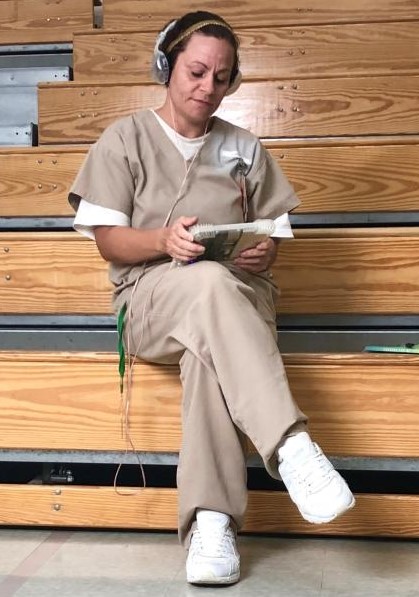
Santa Cruz County Jail now offers Securus 'SecureView' Tablet Rentals to their inmates.
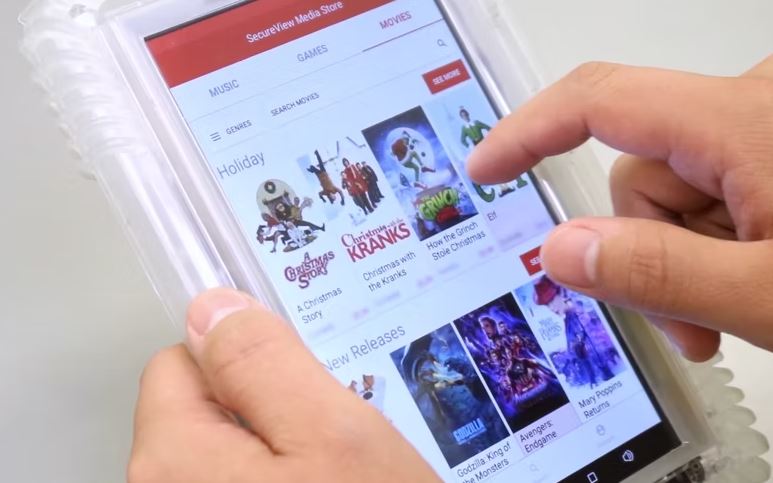
Securus is the same company that handles the inmate phone system, video visitations, email and texting and digital letters.
The tablets can be rented on a monthly basis and while not directly connected to the internet, the inmates can use them for the following activities:
- Phone Calls - Inmates may make calls directly from their tablet allowing for more privacy. The rates are the same as the phones in the unit, and the calls are still recorded and monitored.
- eMessaging - Communicate via a text based message or picture. Fee based system.
- Job Search - Using JobView, a secure job search application, inmates have the ability to see what jobs are available when they are released.
- Education - Free educational platform and course catalog that provides thousands of educational resources.
- Self Help -Inmates have daily access to mental health and addiction recovery programming.
- Music - Top-40, Hip-Hop, Country, Rock, Gospel, and more.
- Law Library - Legal research with up-to-date case information.
- eBooks - Thousands of available titles.
- Religion - Religious resources for spiritual guidance.
- Games - Inmates can play their favorite games. Available through monthly subscriptions
- Facility Services - Digital access to submitted forms, requests, facility documents, and notifications from staff.
Here's how it works:
- Send funds to the inmate and he or she will be able to subscribe and pay at the Santa Cruz County Jail.
Questions:
- By phone - 800-844-6591 or 972-734-1111.
- By email - tablets@securustech.net
How to Rent a Tablet for an Inmate in Santa Cruz County Jail
To rent a tablet for an inmate in Santa Cruz County follow these instructions:
- Register here. It is recommended you use Chrome or Firefox.
- Pay for the subscription using Paypal.
- You get charged the 1st of each month.
- You get charged a full month even if it's only used for a partial month.
- No activation or early termination fees.
- Your Santa Cruz County inmate will recieve their tablet in 3-5 business days, after you pay.
If you have any questions:
- Call - 800-844-6591 or 972-734-1111.
- Email - tablets@securustech.net
For all Santa Cruz County information on Tablet Rentals for your inmate, check out our Tablet Rental Page.
We’ve compiled a list of Frequently Asked Questions and Answers for everything you need to know about Santa Cruz County Jail’s Tablet Policies, Rules and Guidelines. If you still have questions after reviewing these FAQs, call 520-761-7874 for further assistance.
⇓ Learn more ⇓ Show lessWhat are the other City and County Jails in Santa Cruz County?
Santa Cruz County County Jails
Santa Cruz County Juvenile Facilities
⇓ Learn more ⇓ Show lessWhat are the other Jails in the Neighboring Counties surrounding Santa Cruz County?
Nearby counties
The Santa Cruz County Jail serves the following cities and towns of Santa Cruz County: Nogales and Patagonia.