
Sheridan Detention Center
Sheridan Detention Center
Jail Phone Number
870-942-5512Start with the City of Sheridan jail roster. The city posts it for the Sheridan Detention Center, which is the only jail in Grant County. If the name is not on the list, or you need the charge, the bond or the next court date, call the detention center at 870-942-5512. Give the officer the person's full legal name and date of birth so they can find the right booking.
Sheridan sits between Little Rock and Pine Bluff and is the Grant County seat. The detention center is run by the City of Sheridan and shares its Gatzke Drive building with the Sheridan Police Department (870-942-4642). Because Grant County has no jail of its own, people arrested by Sheridan officers and by Grant County sheriff's deputies are booked here. The jail also holds federal prisoners under an agreement with the U.S. Marshals Service. That makes it unlike a small city lockup: a person can stay here for weeks or months while a case moves through court, not just a night or two.
Answers for Grant County families
- Is there a separate Grant County jail I should check? No. The Arkansas Sheriffs' Association lists Grant County as having no jail. Sheriff Pete Roberts's office is at 101 West Pine Street, Room 1, Sheridan, phone 870-942-5039, but the people it arrests are held at the Sheridan Detention Center, so the roster and the jail line above are the places to look.
- What if the person was sent to prison? After a prison sentence, the person leaves Sheridan for the Arkansas Division of Correction. Search for them by name or ADC number on the ADC inmate search.
- Can I get an alert when they are released or moved? Arkansas uses VINE for custody notices. Search and register at VINELink or call 1-800-510-0415 any time of day. Phone alerts are offered in English and Spanish.
- Where do I look up the case? Misdemeanor and city cases are in the Grant County District Court, 870-942-3464. Felony files are kept by the Grant County Circuit Clerk, 870-942-2631. Arkansas also has a statewide case search, Search ARCourts.
- Can I visit? Our visiting section explains how visits at the Sheridan Detention Center are set up.
- Can they call me? See phone calls for how calls from the jail work and what to set up on your end.
- Where do letters go? Write to the person at the detention center. Our mail section gives the address format.
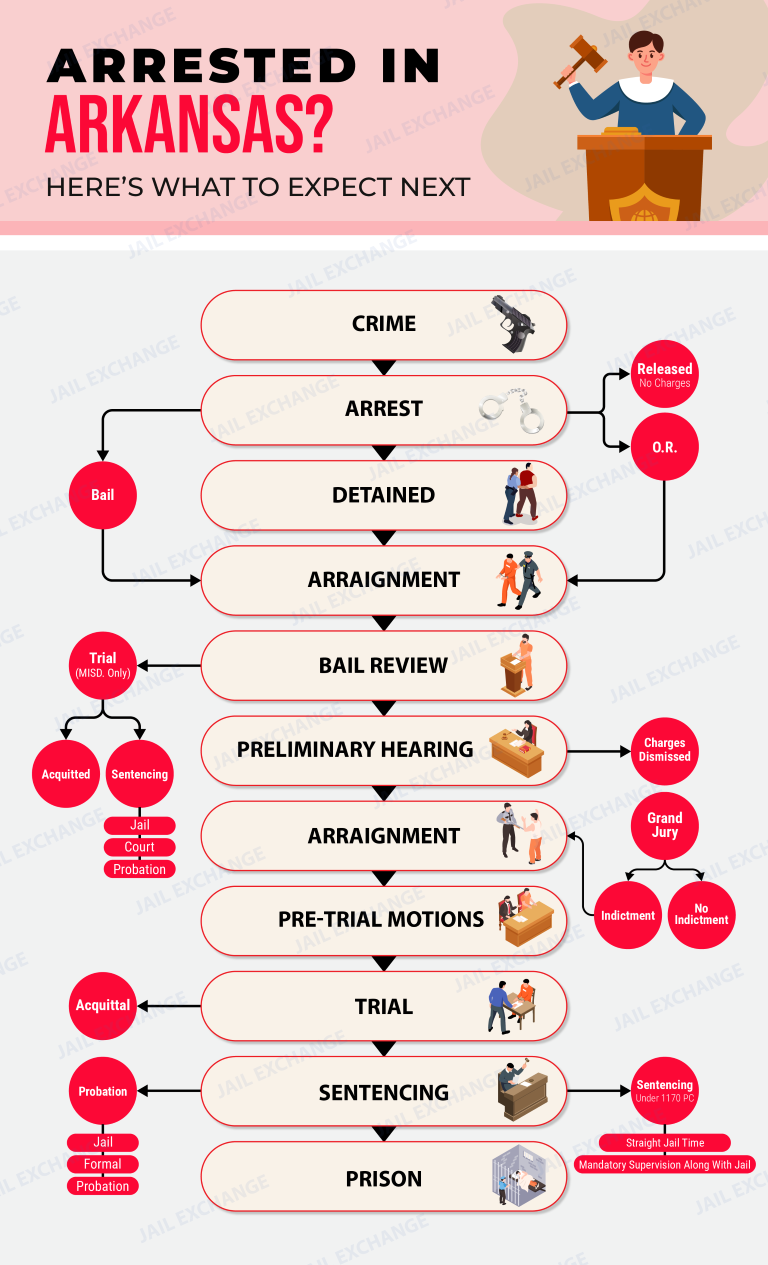
For an arrest in Sheridan or anywhere in Grant County, bail is set by a judge, not by the jail. Arkansas court rules say a person who is not released on a citation must be brought before a judge without unnecessary delay. At that first appearance the judge decides whether the person can go home on a promise to return or must post money bail. The Sheridan Detention Center does not publish its bond desk hours or the payment types it takes. To learn the bond amount and how to pay it, call 870-942-5512 and have the person's full name and date of birth in front of you.
Under Arkansas Rule 9.2, money bail can be set only when nothing less will make sure the person comes back to court. When it is set, the judge picks one of three forms:
- A bond with no money down, signed by the person and sometimes by others too.
- A bond plus a cash deposit of 10 percent of the full amount.
- A fully secured bond, covered by the whole amount in cash, by property or by a licensed bail bondsman.
City charge or state charge: does it matter?
Both kinds start in the same place. The Grant County District Court in Sheridan hears city ordinance cases and state misdemeanors on separate Tuesdays. A felony is a state charge that goes on to the Grant County Circuit Court, and a judge there can change the bond later. Either way, the person waits at the Sheridan Detention Center, because Grant County has no other jail.
What if no one can pay?
The person stays in the detention center until the case ends, the bond is lowered, or a judge lets them out on conditions. They do not move to a county jail first. A lawyer can ask the judge to lower the bond. If the person cannot afford a lawyer, the judge is required to appoint one at the first appearance.
Using a bail bondsman
Only a bondsman licensed in Arkansas can post a surety bond. The bondsman charges a fee, which you do not get back, and may ask for collateral. Read the contract before you sign it, because you can owe the full bond if the person skips court.
Do I get the money back?
With the 10 percent deposit, the rule returns 90 percent of the deposit at the end of the case as long as the bond conditions were kept. Ask the court clerk where any refund will be mailed.
Missing court
A missed court date can lead to a new arrest warrant, loss of the bond and a new charge. If something comes up, call the court clerk before the date, not after.
Video visits at Sheridan Detention Center
Sheridan Detention Center is the city jail that also receives Grant County bookings. Check the City of Sheridan’s jail roster before booking. If the person is not listed or has been transferred, call detention to confirm where they are held.
Schedule video from home
- Sign in to NCIC and pick Sheridan PD - AR at 304 Gatzke Drive. Do not select Sheridan County in Wyoming.
- Choose the person, check for the video option and select a time shown as available. Review the charge before paying. CorrectPay’s Sheridan listing is for deposits, not a video booking.
Before going to the jail
NCIC lists video for Sheridan as off-site only. Ask detention at 870-942-5512 whether a separate on-site visit is available, how to get approved and where to check in at 304 Gatzke Drive, Sheridan, AR 72150. Have the person’s legal name and, if known, their date of birth and arrest or booking date. Ask for an appointment before you drive.
Bring photo ID and keys only unless staff approves another item. No weapons, illegal drugs or other contraband on the property, including in parked vehicles.
Attorney visits
Attorneys should call detention for a confidential legal appointment and confirm check-in, acceptable credentials and what case materials may enter.

NCIC Video Visitation provides a secure online platform that enables families and loved ones to conduct scheduled face-to-face video visits with incarcerated individuals from home. Using an internet-connected smartphone, tablet, or personal computer equipped with a webcam, visitors can connect directly without traveling to the facility.
Important: Advance Registration and Visitor Clearance Required
Detention centers do not permit unscheduled or unverified video sessions. Correctional facilities require prospective visitors to submit government-issued photo identification and receive administrative clearance before booking an appointment, an approval process that can take up to 48 hours depending on facility staffing. You should verify your visitor approval status with the facility prior to scheduling. If you do not register well in advance, you will miss your loved one's scheduled visiting window for the week.
Step-by-Step Instructions to Register and Schedule a Video Visit
- Visit NCIC Scheduling and sign into your account.
- Register your visitor profile and upload a clear photograph of your government-issued ID (driver's license or passport) for facility background review.
- Wait for email notification confirming facility visitor approval.
- Select Video Visitation, choose the detention facility, and select the inmate.
- Browse the available schedule calendar, select an open time slot, and pay the visitation fee using a credit or debit card.
- Log into the website or mobile app 10 minutes prior to the start time on a device with a functioning camera, microphone, and reliable high-speed internet connection.
What the Inmate Needs to Do
The inmate receives a visitation notification on their housing unit video kiosk or terminal. At the appointed time, they log in with their PIN and sit before the terminal. Inmates and visitors must strictly observe jail dress and conduct rules; sessions are monitored by staff and will terminate immediately upon any violation.
Official Provider: NCIC Official Website
Customer Service Telephone: 1-800-943-2189
Support Hours: 24 hours a day, 7 days a week, 365 days a year
Supported Languages: English and Spanish
Other Services Provided by NCIC Inmate Communications
In addition to Remote Video Visitation, NCIC provides calling and digital messaging services at participating facilities:
- Prepaid Phone Calling Accounts: Prepay for phone calling credits so your loved one can call your telephone directly.
• Learn more on our website: Prepaid Calling Accounts Guide | • Visit official vendor page: NCIC Prepaid Calling - Inmate Messaging Services: Send electronic messages and photos directly to an inmate's housing unit terminal.
• Learn more on our website: Inmate Messaging Guide | • Visit official vendor page: NCIC Messaging
Sheridan does not have a separate city court. City cases from the Sheridan Police Department and misdemeanors from the Grant County Sheriff's Office are heard in the Grant County District Court, 33rd District, at 101 West Pine Street, Room 5, Sheridan, AR 72150. The clerk's office answers at 870-942-3464, Monday through Friday, 8:00 a.m. to 4:30 p.m., and closes on major holidays. The court hears misdemeanors, violations of state law and city ordinances, traffic tickets, and civil and small claims cases.
Its criminal calendar runs on Tuesdays:
- First Tuesday: county plea and arraignment
- Second Tuesday: city plea and arraignment
- Third Tuesday: county trials
- Fourth Tuesday: city trials
Someone held at the Sheridan Detention Center sees a judge first. Arkansas Rule 8.1 says a person who is not released on a citation must be taken before a judicial officer without unnecessary delay. At that hearing the judge sets release terms and appoints a lawyer if the person cannot afford one.
Where do felony cases go?
Felonies are heard in the Grant County Circuit Court in Sheridan, part of Arkansas's Seventh Judicial Circuit, which covers Grant and Hot Spring counties. Case files are kept by the Grant County Circuit Clerk at 103 West Center, Room 106, Sheridan, AR 72150, phone 870-942-2631. The circuit clerk's office also handles orders of protection.
How do I find a court date or case online?
Try Search ARCourts, the state judiciary's public case search. If a Grant County case does not show up, call the district court clerk for misdemeanors or the circuit clerk for felonies. Give the full name and date of birth.
What if we disagree with a district court ruling?
District court decisions are appealed to the Grant County Circuit Court. Appeal deadlines are short, so talk to the lawyer or the district court clerk right after the ruling.
Will there be a free lawyer?
Yes, if the person qualifies. Arkansas Rule 8.2 requires the judge to check whether the person can afford a lawyer and, if not, appoint one at the first appearance. Ask for one at that hearing.
How are fines paid?
District court fines can be paid at the clerk's office in Room 5, or by mail with a cashier's check or money order sent to the District Clerk at the same address. The court does not take personal checks.
Information for this service is currently unavailable.
VendEngine / CorrectPay Inmate Kiosk & Web Deposits
Provider: VendEngine • Transitioned to CorrectPay
VendEngine (operating primarily under the consumer platform CorrectPay) provides electronic accounting and kiosk software for county jails and regional detention centers. Family and friends can transfer funds directly into an incarcerated person's jail trust account using a credit or debit card online, via mobile app, or through lobby kiosks, giving them the balance needed to purchase canteen supplies, hygiene products, and snacks.
Important: Facility Intake and Banking Policies Vary
Once a person is booked and moved to a cell, facilities do not always allow cash drop-offs or phone payments directly to the jail window. Some might and you should confirm this by calling the facility and asking. But if you do not register online and fund your loved one's trust account immediately, they may be forced to wait days or weeks for standard paper processing, leaving them without essential soap, clean undergarments, basic medical sundries or snacks.
Step-by-Step Instructions to Register and Deposit Funds
- Confirm the inmate's legal first and last name, date of birth, and assigned jail booking identification number.
- Go to www.correctpay.com or download the CorrectPay app (formerly VendEngine).
- Select Make a Deposit and choose the state and detention center.
- Search for the inmate to verify their profile matches the active housing roster.
- Select Trust Deposits, choose your deposit amount, review convenience fees, and enter your credit or debit card billing information.
- Submit payment and save the digital confirmation receipt for your financial records.
What the Inmate Needs to Do
The inmate does not need an internet account to receive trust funds. Once authorized, the funds post directly to their facility accounting balance. The inmate checks their balance on a dayroom VendEngine kiosk terminal or tablet to place orders on their regular commissary day.
Official Provider: CorrectPay Official Website
Customer Service Telephone: 1-855-836-3364
Support Hours: Monday – Friday, 7:00 AM – 7:00 PM CST; Saturday, 8:00 AM – 5:00 PM CST
Supported Languages: English and Spanish
Other Services Provided by VendEngine / CorrectPay
In addition to Trust Deposits, VendEngine / CorrectPay provides several other communication, financial, and commissary services at participating facilities:
- Commissary Orders & Snack Packs: Order pre-approved snack boxes, food packages, and clothing directly to the jail.
• Learn more on our website: Commissary Orders Guide | • Visit official vendor page: CorrectPay Store Packages - Digital Mail & Email Messaging: Send digital messages and photos directly to their kiosk or tablet.
• Learn more on our website: Digital Messaging Guide | • Visit official vendor page: CorrectPay Messaging - Inmate Phone Time: Prepay for phone calling credits so your loved one can call your telephone directly.
• Learn more on our website: Inmate Phone Time Guide | • Visit official vendor page: CorrectPay Phone Time - Remote Video Visits: Meet face-to-face over secure live video from home.
• Learn more on our website: Video Visitation Guide | • Visit official vendor page: CorrectPay Video Visits
Deposit Money for an Inmate in the Sheridan Detention Center
The Sheridan Detention Center is run by the City of Sheridan and holds people for local, state and federal agencies, so a stay there can last months. Families can add money online, by phone or through an app.
- Website: Make an account at CorrectPay, pick Arkansas and the Sheridan Detention Center, then choose the person and the amount.
- Phone: Card payments are taken at 855-836-3364, 24 hours a day.
- App: The same deposit company has an app for iPhone and Android phones.
- Kiosk: Ask the jail at 870-942-5512 whether a deposit kiosk is set up in the lobby at 304 Gatzke Drive.
The Sheridan Police Department works out of the same building, so you can call that same number with questions about an account.
Yes, you can write to someone at the Sheridan Detention Center. Because Grant County has no other jail, a person can stay here for weeks or months, so letters make sense. Address the envelope like this:
Inmate's Full Name & Inmate ID#
Sheridan Detention Center
1511 Gatzke Drive
Sheridan, AR 72150
Put the person's full legal name on the first line, and add their booking or inmate number if you have it. Write your own name and return address in the top left corner so the letter can come back to you if it is refused.
What to keep in mind
- The jail does not post its mail rules on any official page we could find. Before you send photos, books, magazines or anything besides a plain letter, call 870-942-5512 and ask what is allowed.
- Write in plain words and keep it personal. Leave out anything about the case itself, since a jail letter is not private the way a talk with a lawyer is.
- If the person is sentenced to prison, they leave Sheridan for the Arkansas Division of Correction. Look them up on the ADC inmate search and write to the prison listed there.
NCIC Inmate Communications provides telecommunications services that allow incarcerated individuals to place outbound voice calls from dayroom telephones to family and friends. Because correctional facilities do not permit incoming phone calls, establishing an NCIC prepaid calling account connects calls directly to your cell phone or landline without being blocked by wireless carriers.
Important: Mobile Phones Automatically Block Inmate Calls
Cellular phone carriers automatically reject standard collect calls originating from jail phone systems. While some residential landlines might permit direct monthly billing, mobile devices and internet-based telephone lines require an active prepaid calling balance, which you can verify by checking with your provider. If you do not register online and fund an NCIC account right away, your loved one will receive an automated disconnect announcement when attempting to call your number.
Step-by-Step Instructions to Register and Fund an Account
- Visit account.ncic.com or call NCIC customer care at 1-800-943-2189.
- Click Create Account and register using the primary 10-digit telephone number where you want to receive calls.
- Select the state and correctional facility where your loved one is currently detained.
- Search for and add the inmate using their full legal name or booking ID number.
- Select your deposit dollar amount and enter your debit or credit card billing details.
- Submit payment and ensure your mobile phone settings allow calls from automated or unfamiliar correctional numbers.
What the Inmate Needs to Do
The inmate dials your 10-digit number from any dayroom telephone and keys in their assigned PIN. The automated system verifies that your phone number has an active prepaid balance and prompts you to press a digit to accept the call. All personal telephone conversations are recorded and monitored by facility staff.
Official Provider: NCIC Official Website
Customer Service Telephone: 1-800-943-2189
Support Hours: 24 hours a day, 7 days a week, 365 days a year
Supported Languages: English and Spanish
Other Services Provided by NCIC Inmate Communications
In addition to Prepaid Phone Calling, NCIC provides several other digital communication and visitation services at participating facilities:
- Remote Video Visitation: Schedule and join live face-to-face video visits from home using your computer or smartphone.
• Learn more on our website: Video Visitation Guide | • Visit official vendor page: NCIC Video Visits - Inmate Messaging Services: Send electronic messages and photos directly to an inmate's housing unit terminal.
• Learn more on our website: Inmate Messaging Guide | • Visit official vendor page: NCIC Messaging
NCIC Inmate Messaging allows friends and family members to exchange electronic text messages and digital photos directly with an incarcerated loved one. Messages are delivered electronically to housing unit terminals and tablets within hours, avoiding the lengthy transit times associated with physical postal mail.
Important: Electronic Messaging Screening Rules Differ
Inmates cannot receive incoming phone calls, and traditional postal mail rules differ across correctional agencies. While some facilities still allow regular handwritten letters, many jails have transitioned to digital-only mail scanning or restrict postal delivery, which you can verify by checking facility rules. If you do not register online and purchase messaging credits immediately, your loved one may face lengthy periods without direct written contact from family.
Step-by-Step Instructions to Register and Send Messages
- Go to account.ncic.com and sign in or create a user profile.
- Select Messaging from your dashboard options.
- Select your state and detention center, then search for the inmate using their full legal name or booking ID.
- Purchase a messaging credit bundle using a debit or credit card.
- Type your message in the composition window and attach approved JPEG photos if permitted by the facility.
- Submit your message to the facility's screening queue.
What the Inmate Needs to Do
All electronic correspondence is screened by facility staff before delivery. Once approved, messages appear in the inmate's inbox on their housing unit terminal or tablet. The inmate opens the message, reads your note, and types an electronic reply using their available credits.
Official Provider: NCIC Official Website
Customer Service Telephone: 1-800-943-2189
Support Hours: 24 hours a day, 7 days a week, 365 days a year
Supported Languages: English and Spanish
Other Services Provided by NCIC Inmate Communications
In addition to Inmate Messaging, NCIC provides calling and video visitation services at participating facilities:
- Prepaid Phone Calling Accounts: Fund a calling balance tied directly to your phone number.
• Learn more on our website: Prepaid Calling Accounts Guide | • Visit official vendor page: NCIC Prepaid Calling - Remote Video Visitation: Schedule and join live face-to-face video visits from your computer or smartphone.
• Learn more on our website: Video Visitation Guide | • Visit official vendor page: NCIC Video Visits
NCIC Inmate Communications deploys secure, corrections-grade handheld tablets to incarcerated individuals in county detention centers. Operating on a secure internal wireless network, these devices allow inmates to conduct remote video visits, make voice telephone calls, send electronic messages, stream music, read eBooks, and access self-help and educational resources directly from their housing pods.
Important: Tablet Hardware Deployment and Rental Rules Vary
Detention centers do not manage tablet distribution identically. While some agencies issue individual personal tablets to every detainee at booking, others utilize shared pod docking stations or restrict tablet use to specific dayroom hours, which you should confirm with the facility directly. Although core educational and legal resources are generally provided free of charge, sending messages, listening to music, or making phone calls from the tablet requires an active balance funded by outside contacts.
Step-by-Step Instructions to Support and Fund NCIC Tablets
- Verify that NCIC handheld tablets are active at your loved one's specific detention facility.
- Navigate to account.ncic.com on your computer or mobile device.
- Sign into your verified user account and link the inmate's legal name and booking ID number.
- Select Tablet Media / Messaging or Inmate PIN Debit to add funds to their available balance.
- Specify your deposit dollar amount, review convenience fees, and enter your credit or debit card billing details.
- Submit payment, save your confirmation receipt, and notify your loved one that their device balance is available.
What the Inmate Needs to Do
The inmate unlocks their assigned tablet using their PIN or biometric login. Their available balance appears on the screen, allowing them to download songs, read digital books, write messages, and communicate with approved family members. Devices are returned to charging carts during quiet hours and shift counts for overnight recharging.
Official Provider: NCIC Official Website
Customer Service Telephone: 1-800-943-2189
Support Hours: 24 hours a day, 7 days a week, 365 days a year
Supported Languages: English and Spanish
Other Services Provided by NCIC Inmate Communications
In addition to Tablet Services, NCIC provides several other communication, financial, and visitation options:
- Prepaid Phone Calling Accounts: Prepay for phone calling credits so your loved one can call your telephone directly.
• Learn more on our website: Prepaid Calling Accounts Guide | • Visit official vendor page: NCIC Prepaid Calling - Remote Video Visitation: Schedule and join live face-to-face video visits from your computer or smartphone.
• Learn more on our website: Video Visitation Guide | • Visit official vendor page: NCIC Video Visits - Inmate Messaging Services: Send electronic messages and photos directly to an inmate's terminal or tablet.
• Learn more on our website: Inmate Messaging Guide | • Visit official vendor page: NCIC Messaging - Inmate Trust & Commissary Money Deposits: Send canteen funds directly into an incarcerated person's jail trust account.
• Learn more on our website: Trust Deposits Guide | • Visit official vendor page: NCIC Trust Deposits
- Jail (Main): 870-942-5512
- Grant County Sheriff: 870-942-2101
- Sheridan Police: 870-942-4642
The Sheridan Detention Center serves the following cities and towns of Grant County: Prattsville and Sheridan.