
Jefferson County Jail
Jefferson County Jail
The 162-bed Jefferson County Jail provides 24-hour phone access for inmate information at 478-625-7077.
After an arrest for a misdemeanor or felony in the county, the person is brought to this jail for booking and processing. They may be bonded out, released on their own recognizance, or held until their trial is decided, depending on the seriousness of the charges.
Use the inmate search tool to check the list of people currently in custody.
Convicted inmates with less than a year to serve remain in this county. Those with longer sentences are transferred to the Georgia State Prison System or the Federal Bureau of Prisons.
This page provides details on searching the official jail roster, directions to the jail, and inmate services including the visitation schedule, funding an account, sending mail, receiving phone calls, voicemail, emailing and texting, tablet rentals, bail bonds, and commissary.
Save the inmate’s jail ID or booking number because it’s often required. If it’s not online, call Jefferson County Jail at 478-625-7077.
Inmate Services
Other Jails and Prisons
To search for an inmate in the Jefferson County Jail, review their criminal charges, the amount of their bond, when they can get visits, or even view their mugshot, go to the Official Jail Inmate Roster, or call the jail at 478-625-7077 for the information you are looking for. You can also look up an Jefferson County offender's Criminal Court Case online.
Jefferson County Jail Inmate Search
The Jefferson County Jail maintains an average of 162 offenders in custody on any given day. The Jefferson County Jail has a monthly turnover of 40% of their inmate population, another 30% turnover every 90 days, another 20% every six months, and approximately 10% stay incarcerated between six and twelve months. Every year Jefferson County law enforcement agencies arrest and detain approximately 8,520 offenders.
⇓ Learn more ⇓ Show lessThe 162-bed Jefferson County Jail is responsible for the housing and care of those who are accused or convicted of committing a misdemeanor or felony in Jefferson County as they wait for their trial or as they serve their sentence, usually less than one year.
It serves many law enforcement organizations including the Sheriff’s Department, local police, Immigration, and other surrounding counties as needed.
The single story, brick and blue steel facility is located on Clarks Mill Road in Louisville, Georgia, right next door to the Jefferson County Correctional Institution.
If you have questions regarding an inmate or the programs and services provided, the staff can be reached at 478-625-7077, and an online listing of all the detainees is published for your own investigation.
Upon intake, the booking process is completed, which includes a medical screening, fingerprinting and mugshots, DNA sample, along with an assessment to determine security needs, medical needs, mental health requirements, and housing assignment.
Staff is available to transport all inmates to court dates and any medical appointments or emergency needs, as well as inspecting all mail for contraband, receiving commissary funds and other money for inmates, maintaining the safety of the community and the security of the facility, and other tasks.
The Jefferson County Jail also provides several other services to inmates including basic needs in meals, laundry, and hygiene items, and programs including AA, counseling, religious programs, education, recreation, and opportunities to grow social and life skills.
Along with the efforts made by the staff, reduced recidivism is seen when inmates are able to stay in contact and supported by their family or friends who are not incarcerated so mail, phones, and visits are provided.
Visits are in person, and are via video and an account is created online to book and complete visits, allowing both visitors and inmates to schedule a visit.
Phone accounts are also registered online, and allow for inmates to make outgoing calls during the daytime and evening hours when they are not participating in a task or program.
Information for money for an inmate’s commissary can be found on our Inmate Money page.
All personal mail is sent to:
Inmate's Full Name & Inmate ID#
Jefferson County Jail
911 Clarks Mill Road
Louisville, GA 30434
Staff will open each piece and look for contraband, which is removed before it is given to the inmate.
Legal mail, money orders, books and newspaper and magazine subscriptions are mailed to:
Inmate's Full Name & Inmate ID#
Jefferson County Jail
911 Clarks Mill Road
Louisville, GA 30434
- Jail (Main): 478-625-7077
What should you know about the booking process at Jefferson County Jail?
Once arrested, the person is taken to Jefferson County Jail for booking, a process that confirms identity, assesses charges, and determines if they will be released on their own recognizance, posted for bail, or held until court.
Staying silent is key during this process, as anything spoken can be used as evidence in court. It’s best to wait for legal counsel before responding to questions.
Steps involved in booking at Jefferson County Jail include:
- Confirming identity.
- Taking mugshots for record.
- Medical, mental health, and substance history questioning.
- DNA collection if applicable.
- Comprehensive physical search.
- Seizing personal property.
- Access to a free phone call.
To check on an offender’s bond amount, contact Jefferson County Jail at 478-625-7077.
Steps to pay bail in Jefferson County
After an arrest, individuals are brought to Jefferson County Jail in Louisville for processing. Following this, three possible outcomes exist:
1. The individual may be released without posting bail, with a promise to appear in court.
2. The individual could be held in jail until their court date.
3. Bail or bond can be posted for release; for more information, contact 478-625-7077.
Bail payment can be handled through various means.

- Pay a cash bond in full at the bonding window inside the jail or at the clerk of court, by cash, cashier's check or money order; a lobby kiosk or online bond vendor often takes debit and credit cards for an extra fee, and you should bring the inmate's full name and booking number (the jail can be reached at 478-625-7077).
- Licensed bail bond agents in Jefferson County are available for assistance.
- Land or a home can often serve as bond collateral: the owner provides a deed and a recent tax or appraisal value showing clear title and equity of at least the bond amount, commonly double, and the court that set bail approves the pledge.
To learn more about the bail process in Jefferson County, Georgia, visit the Jefferson County Jail Bail Page.
⇓ Learn more ⇓ Show lessHow Do You Visit an Inmate in the Jefferson County Jail? What is the Schedule?
Jefferson County Jail Inmate on-site Video Visitation
911 Clarks Mill Rd
Louisville, GA 30434-1713
478-625-7077
- First, you must register with Homewav Communications online.

- This requires uploaded a recent photo and a copy of your valid, government issued photo ID.
- Once you do this, you can choose Jefferson County Jail, choose your inmate and then schedule a time.
ON SITE VISITATION SCHEDULE
| DAY | TIMES |
| MONDAY | 8:00AM - 3:45PM |
| TUESDAY | 8:00AM - 3:45PM |
| WEDNESDAY | 8:00AM - 3:45PM |
| THURSDAY | 8:00AM - 3:45PM |
| FRIDAY | 8:00AM - 3:45PM |
| SATURDAY | No visitation |
| SUNDAY | No visitation |
Jefferson County Jail Inmate Remote Video Visitation
911 Clarks Mill Rd
Louisville, GA 30434-1713
478-625-7077
- First, you must register with Homewav Communications online.
- This requires uploaded a recent photo and a copy of your valid, government issued photo ID.
- Once you do this, you can choose Jefferson County Jail, choose your inmate and then schedule a time.
REMOTE VISITATION SCHEDULE
| DAY | TIMES |
| MONDAY | 8:00AM - 9:45PM |
| TUESDAY | 8:00AM - 9:45PM |
| WEDNESDAY | 8:00AM - 9:45PM |
| THURSDAY | 8:00AM - 9:45PM |
| FRIDAY | 8:00AM - 9:45PM |
| SATURDAY | 8:00AM - 9:45PM |
| SUNDAY | 8:00AM - 9:45PM |
The Jefferson County Jail uses Homewav for all Video Visitation services.
The information below provides complete instructions regarding:
Visiting Hours and Visitation Schedule,
Visitation Rules,
Application & Registration
Inmate Video Visits, and
Jail Visitation Process for the Jefferson County Jail
Jefferson County Jail uses HomeWAV for Inmate Video Visitation.

Off-site remote visits are simple and convenient for both inmates and you.
Outgoing calls can be initiated from the detention facility without the need for advanced scheduling.
HomeWAV is compatible with both Apple iOS and Android.
HomeWAV is compatible with most major browsers on either PC or Mac computers, but works best with Google Chrome.
Following these instructions exactly will enhance your chances of having trouble-free visits.
How Much does Homewav Cost?
Jefferson County Jail charges $0.50 cents per minute for video visitation and $1.00 for each video message.
There is NO minimum talk time. Each ‘call’ can be as short as one minute.
In addition, there is a $1.00 fee for any purchase. All “Talk to me Funds” can only be used between the inmate and the visitor who owns the account.
How does HomeWAV video visitation work?
1. Sign Up Here.
2. Complete both steps of the registration process
3. Add ‘Talk to me Funds’ to your account using your credit or debit card.
4. Then you just wait for the inmate to call
How Do I add Funds to my account?
1. Once you are logged in, click “Add Talk to Me Funds
2. Type in the amount of dollars you want to add to your account.
3. Click “Update”
4. Choose a way to pay (Credit, debit, or prepaid card.)
Can I use HomeWAV on my smartphone or tablet?
Yes, however your HomeWAV account must be first set up online from a computer.
Once you have added funds to your account, you will need to install the Homewav app onto your phone or tablet.
To receive calls you must log in through the app and wait for the inmate to initiate the call.
You cannot add funds or make any changes to your account information through the app. These options are only available through the website.
The app should be solely used for video visitation.
What are the minimum PC requirements?
1. A computer with Windows Operating System. (Note: HomeWAV works best with Chrome.)
2. Speakers or Headphones
3. Camera and microphone
Can I use HomeWAV from the jail lobby if I don’t have a computer?
Yes, Jefferson County Jail has a HomeWAV kiosk in their lobby for you to use if you don’t have a computer or smartphone, however due to COVID issues you may be temporarily prohibited entrance into their lobby.
How does the Inmate Know I am Logged in and Ready to Visit?
1. Make sure there are funds in your account and that you are marked as “appear online”.
2. The moment you log in, the HomeWAV screen at the facility will light up green and display the inmates name. This informs the inmate that they have a visitor that is now logged on.
3. Once the inmate sees the notification, he or she will initiate the call.
4. When the inmate initiates the call, a ringing sound will take place and a pop-up box will appear, asking you if you want to accept the call.
Can I transfer funds from one inmate to another?
If you have multiple inmates and would like to transfer your funds to a different inmate, please call HomeWAV at 314-764-2872 or email support@homewav.com and include the following information:
1. Homewav account holder’s name.
2. The number of minutes to be transferred.
3. Facility Name.
4. From which inmate to who do you want to transfer funds.
How do I get a refund on leftover funds?
Email HomeWAV at refunds@homewav.com with your refund request.
REFUNDS are subject to a $7.50 processing fee. *Note* refund requests must be sent from the email address of the registered visitor.
How can I contact HomeWAV if I’m having any problems?
HomeWAV Visitor Support is available 7 days a week during the following hours:
Monday – Friday
9:00AM to 6:00PM EST
Saturday – Sunday
8:00AM to 6:00PM EST
HomeWAV Customer Service: Call 314-764-2872, or toll free 844-394-6639.
HomeWAV Frequently Asked Questions
We’ve compiled a list of Frequently Asked Questions and Answers for everything you need to know about Jefferson County Jail’s Inmate Visitation Policies, Rules and Guidelines. If you still have questions after reviewing these FAQs, call 478-625-7077 for further assistance.
⇓ Learn more ⇓ Show lessCan I Use My Computer or Phone to Have a Remote Video Visit with an Inmate in the Jefferson County Jail?
The information below provides complete instructions regarding Homewav Video Visitation for Jefferson County Jail:
Visiting Hours and Visitation Schedule,
Visitation Rules,
Application & Registration
Inmate Video Visits, and
Jail Visitation Process for the Jefferson County Jail
Jefferson County Jail uses HomeWAV for Inmate Video Visitation.
Off-site remote visits are simple and convenient for both inmates and you.
Outgoing calls can be initiated from the detention facility without the need for advanced scheduling.
HomeWAV is compatible with both Apple iOS and Android.
HomeWAV is compatible with most major browsers on either PC or Mac computers, but works best with Google Chrome.
Following these instructions exactly will enhance your chances of having trouble-free visits.
How Much does Homewav Cost?
Jefferson County Jail charges $0.50 cents per minute for video visitation and $1.00 for each video message.
There is NO minimum talk time. Each ‘call’ can be as short as one minute.
In addition, there is a $1.00 fee for any purchase. All “Talk to me Funds” can only be used between the inmate and the visitor who owns the account.
How does HomeWAV video visitation work?
1. Sign Up Here.
2. Complete both steps of the registration process
3. Add ‘Talk to me Funds’ to your account using your credit or debit card.
4. Then you just wait for the inmate to call
How Do I add Funds to my account?
1. Once you are logged in, click “Add Talk to Me Funds
2. Type in the amount of dollars you want to add to your account.
3. Click “Update”
4. Choose a way to pay (Credit, debit, or prepaid card.)
Can I use HomeWAV on my smartphone or tablet?
Yes, however your HomeWAV account must be first set up online from a computer.
Once you have added funds to your account, you will need to install the Homewav app onto your phone or tablet.
To receive calls you must log in through the app and wait for the inmate to initiate the call.
You cannot add funds or make any changes to your account information through the app. These options are only available through the website.
The app should be solely used for video visitation.
What are the minimum PC requirements?
1. A computer with Windows Operating System. (Note: HomeWAV works best with Chrome.)
2. Speakers or Headphones
3. Camera and microphone
Can I use HomeWAV from the jail lobby if I don’t have a computer?
Yes, Jefferson County Jail has a HomeWAV kiosk in their lobby for you to use if you don’t have a computer or smartphone, however due to COVID issues you may be temporarily prohibited entrance into their lobby.
How does the Inmate Know I am Logged in and Ready to Visit?
1. Make sure there are funds in your account and that you are marked as “appear online”.
2. The moment you log in, the HomeWAV screen at the facility will light up green and display the inmates name. This informs the inmate that they have a visitor that is now logged on.
3. Once the inmate sees the notification, he or she will initiate the call.
4. When the inmate initiates the call, a ringing sound will take place and a pop-up box will appear, asking you if you want to accept the call.
Can I transfer funds from one inmate to another?
If you have multiple inmates and would like to transfer your funds to a different inmate, please call HomeWAV at 314-764-2872 or email support@homewav.com and include the following information:
1. Homewav account holder’s name.
2. The number of minutes to be transferred.
3. Facility Name.
4. From which inmate to who do you want to transfer funds.
How do I get a refund on leftover funds?
Email HomeWAV at refunds@homewav.com with your refund request.
REFUNDS are subject to a $7.50 processing fee. *Note* refund requests must be sent from the email address of the registered visitor.
How can I contact HomeWAV if I’m having any problems?
HomeWAV Visitor Support is available 7 days a week during the following hours:
Monday – Friday
9:00AM to 6:00PM EST
Saturday – Sunday
8:00AM to 6:00PM EST
HomeWAV Customer Service: Call 314-764-2872, or toll free 844-394-6639.
HomeWAV Frequently Asked Questions
We’ve compiled a list of Frequently Asked Questions and Answers for everything you need to know about Jefferson County Jail’s Video Remote Visitation Policies, Rules and Guidelines. If you still have questions after reviewing these FAQs, call 478-625-7077 for further assistance.
⇓ Learn more ⇓ Show lessHow Do You Deposit Money for an Inmate in the Jefferson County Jail?
There are two options for putting money on an inmate's books:
Choice 1 - Deposit Inmate Money Online
Jefferson County Jail uses CommissaryDeposit.com to process all online deposits to an inmate's account. The company charges you a small fee for doing so, but the fee probably isn't as much as gas and parking would cost to take it to the jail in person.
Choice 2 - Mail the Inmate Deposit to the Jail
Mailing a deposit takes more time to process than the other methods but can be done if you live too far away to bring it in person and you don't have a debit/credit card for online deposits. Never send cash. Always send a Money Order from the US Post Office, a reputable bank or Western Union.
Make the Money Order out to the inmate's name and put their Inmate ID# in memo section of the Money Order.
**Call 478-625-7077 first to ask Jefferson County Jail if this option is still available.
How to Deposit Money Online for an Inmate's Commissary Account in Jefferson County
To deposit money in an Jefferson County Jail inmate's commissary account follow these instructions:
- Start here and click ‘DEPOSIT MONEY’ in CommissaryDeposit.com
- Choose Georgia
- Choose Jefferson County Jail
- View the date your order will be delivered, then click ‘NEXT’.
- Search for, then Select your inmate.
- Choose the amount to send.
- Register, and Pay for the deposit transaction

Note: You will be charged a fee to send money to your Jefferson County inmate. In addition, there is a maximum amount you can send.
Contact Information
Customer Support page.
Customer Support phone: 912-584-6102
Email - Support@commdeposit.com
Customer Support Hours - Monday - Friday, 8:00 AM to 4:30 PM EST
For complete information on fees, products, policies, deadlines, rules, minimum and maximum deposits and all the information you need to know regarding depositing money for your inmate in Jefferson County, go to our Send Money Page for details.
We’ve compiled a list of Frequently Asked Questions and Answers for everything you need to know about Jefferson County Jail’s Inmate Money and Trust Fund Policies, Rules and Guidelines. If you still have questions after reviewing these FAQs, call 478-625-7077 for further assistance.
⇓ Learn more ⇓ Show lessHow Do I Receive Phone Calls from an Inmate in the Jefferson County Jail?
How an Inmate Makes a Phone Call to You or Others from Jefferson County Jail
To set up a phone account so that your inmate can call you from Jefferson County do the following:
1. Enroll in an account with Securus Technologies.

2. Choose one of three account types, Securus Debit, Advance Connect or Direct Bill.
3. Choose Jefferson County Jail, then connect with your inmate.
4. If you have any questions, call Securus: 972-734-1111 or 800-844-6591.
To find out fees, how to's, calling times, limits on phone calls and other systems Securus has do that you can communicate with your Jefferson County inmate, check out our Inmate Phone Page.
NOTE: All of your inmate's phone calls are recorded and stored. It is advised not to discuss their pending case.
We’ve compiled a list of Frequently Asked Questions and Answers for everything you need to know about Jefferson County Jail’s Inmate Phone Policies, Rules and Guidelines. If you still have questions after reviewing these FAQs, call 478-625-7077 for further assistance.
⇓ Learn more ⇓ Show lessHow do I Mail an Inmate in the Jefferson County Jail, and what can I send them?
Jefferson County Jail Inmate Mail Guidelines

Postcards
Ask the Jefferson County Jail whether it accepts postcards, and what size and type, before mailing one. Always include your name and return address.
Envelopes
The Jefferson County Jail also allows envelopes to be mailed to inmates. It is best to only use blue or black ink.
Postcards and envelopes MUST HAVE the sender's full name and return address on the envelope.
Postcards and envelopes MUST be mailed to the following address:
Inmate's Full Name & Inmate ID#
Jefferson County Jail
911 Clarks Mill Road
Louisville, GA 30434
Legal Mail

Send all Legal Mail to this Address:
Inmate's Full Name & Inmate ID#
Jefferson County Jail
911 Clarks Mill Road
Louisville, GA 30434
Newspapers
Newspapers may also be mailed to an inmate as long as they are shipped directly from the publisher.
Magazines
News, special interest or sports magazines may also be mailed to an inmate as long as they are shipped directly from the publisher. Any magazines that contain profanity, weapons, pornography or other content that is adult in nature will be confiscated by the jail staff and will NOT be delivered to the inmate.
Books
Ask the Jefferson County Jail whether books can be mailed in, and whether they must come straight from a publisher or retailer such as Amazon, Barnes & Noble or Books-A-Million. You can order them directly from your computer and have them shipped to the inmate at the address noted.
Books must NOT contain images or content that are considered excessively violent, pornographic or obscene. Any book that does not meet the Jefferson County Jail standards will be disposed of.
Ask the Jefferson County Jail whether hardcover books are accepted.
All newspapers, magazines and books are to be shipped to:
Inmate's Full Name & Inmate ID#
Jefferson County Jail
911 Clarks Mill Road
Louisville, GA 30434
Jefferson County Jail Inmate Mail Policies and Address - What Can You Send, and Where?
For inmates receiving mail in the Jefferson County Jail there are different addresses and policies depending on the inmate's status, as well as what type of mail they are receiving; personal mail, legal mail, subscriptions or books sent from a third-party such as Amazon.
All mail is to be shipped to the Jefferson County Jail:
Inmate's Full Name & Inmate ID#
Jefferson County Jail
911 Clarks Mill Road
Louisville, GA 30434
For complete information on mail policies, what you can send an inmate and what address to send them, check out our Inmate Mail page.
We’ve compiled a list of Frequently Asked Questions and Answers for everything you need to know about Jefferson County Jail’s Inmate Mail Policies, Rules and Guidelines. If you still have questions after reviewing these FAQs, call 478-625-7077 for further assistance.
⇓ Learn more ⇓ Show lessCan I purchase Commissary Online for an Inmate in the Jefferson County Jail, and what can I purchase?
Jefferson County Jail uses the services of CommissaryOrder.com to provide commissary for their inmates.

Ordering from CommissaryOrder.com is a simple process:
- Start here and click ‘PLACE ORDER’
- Choose Georgia
- Choose Jefferson County Jail
- View the date your order will be delivered, then click ‘NEXT’.
- Search for, then Select your inmate.
- Choose your items. (scroll down to see the items available)
- Pay for the items.
Commissary Order Fees
In addition to the items you purchase, you will pay a ‘service fee’ for each item selected. The first item you select will cost you a fee of $2.00-3.00, then an additional $0.35 to $0.50 for each item you select after that.
Maximum Amount
Jefferson County Jail only allows you to purchase a maximum amount of $200.00 worth of products at a time.
Items you may Purchase from CommissaryDeposit.com:
- Clothing - thermals, underwear, bras, shoes.
- Stationary, envelopes, stamps, playing cards, board games
- Toiletries, hygiene, reading glasses, medicated creams, aspirin
- Soda, energy drinks, coffee, packaged meat & fish, soups, cookies, chips, pastries.
Customer Support
- CommissaryOrder.com only provides customer support via email at Support@CommissaryOrder.com
Inmate Money Deposit Option
If you do NOT want to choose the commissary items for your inmate, but have them decide for themselves, go to CommissaryDeposit.com and send them money direct so they can purchase the items they want.
The fees to send money directly to your inmate are as follows:
$0.01 - $25.00 = $3.25 + 3%
$25.01 - $100 = $4.50 + 3%
$100.01 to $200 = $6.00 + 3%
$200.01 & up = $7.50 + 3%
(NOTE: The maximum allowed deposit is $260.00)
How to Deposit Money Online for an Inmate's Commissary Account in Jefferson County
To deposit money in an Jefferson County Jail inmate's commissary account follow these instructions:
- Start here and click ‘DEPOSIT MONEY’ in CommissaryDeposit.com
- Choose Georgia
- Choose Jefferson County Jail
- View the date your order will be delivered, then click ‘NEXT’.
- Search for, then Select your inmate.
- Choose the amount to send.
- Register, and Pay for the deposit transaction
Note: You will be charged a fee to send money to your Jefferson County inmate. In addition, there is a maximum amount you can send.
Contact Information
Customer Support page.
Customer Support phone: 912-584-6102
Email - Support@commdeposit.com
Customer Support Hours - Monday - Friday, 8:00 AM to 4:30 PM EST
For complete information on fees, products, policies, deadlines, rules, minimum and maximum deposits and all the information you need to know regarding depositing money for your inmate in Jefferson County, go to our Send Money Page for details.
We’ve compiled a list of Frequently Asked Questions and Answers for everything you need to know about Jefferson County Jail’s Commissary Policies, Rules and Guidelines. If you still have questions after reviewing these FAQs, call 478-625-7077 for further assistance.
⇓ Learn more ⇓ Show lessHow Can I Communicate with an Inmate in the Jefferson County Jail using an Online Messaging Service?
Jefferson County Jail uses Securus eMessaging for Inmate Email.
Register here. (You are already registered if you signed up with Securus for 'Phone' or 'Remote Visitation').
Steps:
1. Sign up for eMessaging
2. Find your inmate.
3. Purchase a book of Securus ‘stamps’.
4. Type & Send message.
Things you CAN do:
1. You CAN ONLY send messages from the Securus website, or with the Securus app. (links below).
2. You CAN transfer ‘stamps’ to your inmate.
3. You CAN deposit money to your inmate, and they can purchase ‘stamps’ on their end.
4. Each time you send a message, you CAN pay for them to reply.
5. You CAN send photos. (Jail staff will review for appropriateness)
Things you CANNOT do:
1. You CANNOT use your own personal email to send messages.
2. You CANNOT send any message or photo that would normally be rejected by regular mail.
Other Things:
1. Photos must be .jpg, .jpeg or .png.
2. eMessages and photos must meet the jail’s standards for regular mail.
3. If your eMessage or Photo is rejected you will be notified of the reason, but you will NOT get a refund.
What is the cost of sending inmate messages?
- Send a text Message - 1 stamp
- Purchase a reply for your inmate - 1 stamp
- Attach up to 5 photos - 1 stamp each photo
- Share up to 5 eCards - 1 stamp each eCard
- Send just a photo with no text - 1 stamp
- Send a 30 second VideoGram - 3 stamps
What can your inmate do with digital 'stamps'?
- Reply to your eMessage if you attach a return stamp
- Receive transferred stamps you share with them (no cost to transfer)
- When available, they can purchase their own stamps from their Inmate Debit Account
Contact Information and Help:
eMessaging FAQ
eMessaging Signup & Helpful Information
Online Customer Service Support
Phone Support: 972-734-1111 or 800-844-6591
iphone app
Android app
Mailing Check payments
Securus Correctional Billing Services
PO Box 650757
Dallas, Texas 75265-075
How to Send a Text or Email Message to an Inmate in Jefferson County Jail
To send a text or email message to a Jefferson County inmate, do the following:
Jefferson County Jail uses Securus eMessaging for Inmate Email.
Register here. (You are already registered if you signed up with Securus for 'Phone' or 'Remote Visitation' in Jefferson County or any jail or prison in the country).
Steps:
1. Sign up for eMessaging
2. Find your Jefferson County inmate.
3. Purchase a book of Securus ‘stamps’.
4. Type & Send message.
For all Jefferson County information for sending secure messages to an inmate in Jefferson County Jail, including instructions, video examples, fees, limits, tablet rentals and more, check out out Text/Email an Inmate Page.
We’ve compiled a list of Frequently Asked Questions and Answers for everything you need to know about Jefferson County Jail’s Text and Email Policies, Rules and Guidelines. If you still have questions after reviewing these FAQs, call 478-625-7077 for further assistance.
⇓ Learn more ⇓ Show lessDo Inmates in the Jefferson County Jail have Access to Tablets or Computers?
Jefferson County Jail now offers Securus 'SecureView' Tablet Rentals to their inmates.
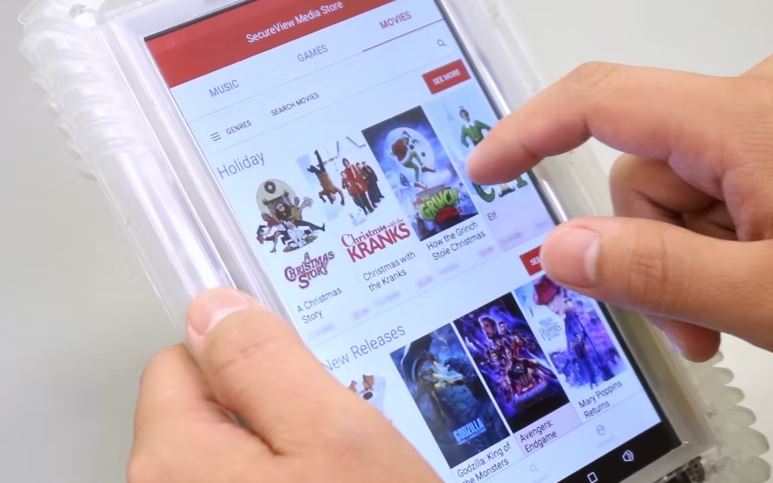
Securus is the same company that handles the inmate phone system, video visitations, email and texting and digital letters.
The tablets can be rented on a monthly basis and while not directly connected to the internet, the inmates can use them for the following activities:
- Phone Calls - Inmates may make calls directly from their tablet allowing for more privacy. The rates are the same as the phones in the unit, and the calls are still recorded and monitored.
- eMessaging - Communicate via a text based message or picture. Fee based system.
- Job Search - Using JobView, a secure job search application, inmates have the ability to see what jobs are available when they are released.
- Education - Free educational platform and course catalog that provides thousands of educational resources.
- Self Help -Inmates have daily access to mental health and addiction recovery programming.
- Music - Top-40, Hip-Hop, Country, Rock, Gospel, and more.
- Law Library - Legal research with up-to-date case information.
- eBooks - Thousands of available titles.
- Religion - Religious resources for spiritual guidance.
- Games - Inmates can play their favorite games. Available through monthly subscriptions
- Facility Services - Digital access to submitted forms, requests, facility documents, and notifications from staff.

Here's how it works:
- Send funds to the inmate and he or she will be able to subscribe and pay at the Jefferson County Jail.
Questions:
- By phone - 800-844-6591 or 972-734-1111.
- By email - tablets@securustech.net
How to Rent a Tablet for an Inmate in Jefferson County Jail
To rent a tablet for an inmate in Jefferson County follow these instructions:
- Register here. It is recommended you use Chrome or Firefox.
- Pay for the subscription using Paypal.
- You get charged the 1st of each month.
- You get charged a full month even if it's only used for a partial month.
- No activation or early termination fees.
- Your Jefferson County inmate will recieve their tablet in 3-5 business days, after you pay.
If you have any questions:
- Call - 800-844-6591 or 972-734-1111.
- Email - tablets@securustech.net
For all Jefferson County information on Tablet Rentals for your inmate, check out our Tablet Rental Page.
We’ve compiled a list of Frequently Asked Questions and Answers for everything you need to know about Jefferson County Jail’s Tablet Policies, Rules and Guidelines. If you still have questions after reviewing these FAQs, call 478-625-7077 for further assistance.
⇓ Learn more ⇓ Show lessWhat are the other City and County Jails in Jefferson County?
Jefferson County County Jails
Jefferson County Juvenile Facilities
⇓ Learn more ⇓ Show lessWhat are the other Jails in the Neighboring Counties surrounding Jefferson County?
This facility, known as "Jefferson County Jail" is also known as Jefferson County Jail, Georgia, Jefferson.