
Hidalgo County Jail & Detention Center
Hidalgo County Jail & Detention Center
Physical Address
83 Old Hwy 70Lordsburg, NM 88045
Jail Phone Number
575-542-3050Hidalgo County Inmate Search and Booking Information
Find someone in custody in Hidalgo County. Call detention in Lordsburg and ask for a custody check. The sheriff’s office at 575-542-3833 can help identify the local arresting agency or receiving facility.
If someone was stopped near the state line or taken into custody by a federal agency, first confirm who made the arrest. A county detention search and a federal locator cover different custody systems.
Before you visit or send money: Confirm where the person is held and ask for the booking or inmate number. Confirm you have the person’s current housing assignment before setting up a phone or video account. Ask detention for the current provider and the correct mailing format.
Read inmate search answers
 Read inmate search answers
1. How do I find someone in custody in Hidalgo County?
Call detention in Lordsburg and ask for a custody check. The sheriff’s office at 575-542-3833 can help identify the local arresting agency or receiving facility. Write down the facility, booking or inmate number and the time you confirmed custody. Keep any court case number separate.
↑ Back to the question list2. Who can I call to check a booking?
Contact Hidalgo County Detention Center at 83 Old US Highway 70, Lordsburg. Call 575-542-3050. Start with the full name, date of birth, approximate arrest date and the city or agency involved. If you already have a booking number, give that first. Official contact and facility information.
↑ Back to the question list3. What if the person does not show up?
Check spelling, hyphens, both surnames and the name used at arrest. With a recent arrest, ask whether intake is complete. If the jail has no record, ask the arresting agency where the person was taken and call that facility. A missing entry by itself does not establish a release.
↑ Back to the question list4. How can I find out if they went to another jail?
If someone was stopped near the state line or taken into custody by a federal agency, first confirm who made the arrest. A county detention search and a federal locator cover different custody systems. Ask when the person arrived or whether they were transferred, and get the receiving jail’s phone number. Call the receiving jail to confirm it accepted the person before arranging a ride, mailing anything or depositing money.
↑ Back to the question list5. Can I see a booking photo or mugshot?
If a booking record has a photo, compare the booking date and identifying details with what you know. If there is no photo, ask the facility’s records office whether photos are available and what request it accepts. A booking record shows an arrest or intake. The court record is where to check how a charge was resolved.
↑ Back to the question list6. How do I check for an active warrant?
Contact the agency or court that may have issued the warrant. Give the person’s full name and the case number if you have it. The New Mexico Courts public case search can help identify a case and its court, but a missing entry or an old jail listing cannot confirm whether a warrant is active.
↑ Back to the question list7. Where can I see the charges and next court date?
Write down the charge names and any case number you find in the booking record. Search New Mexico Courts public case search and call the clerk listed for that case to confirm the hearing time, courthouse and any public access instructions. For local court contacts, see the JailExchange court guide.
↑ Back to the question list8. Who can tell me whether bond was set or when they will be released?
For a local criminal case, confirm the latest release order with the court and ask the housing jail how it processes the order. A payment can still leave a separate hold to resolve, so ask about pickup before driving. Use the JailExchange bail guide for local contacts and procedures.
↑ Back to the question list9. Can I get a release or transfer notification?
Check New Mexico VINE or call 877-551-8463. If you can locate the record, follow the enrollment steps and keep your contact information current. If the service cannot find the person, ask the holding agency about its custody updates and victim notification process.
↑ Back to the question list10. How can I talk to someone in custody?
Ask the confirmed facility which phone service it uses and whether the person needs your number on an approved list. Ask how they can place an outgoing call. If a call is blocked, confirm the facility and account type before buying more credit. Ask counsel how to arrange a confidential legal call.
↑ Back to the question list11. How can I set up a visit?
Confirm you have the person’s current housing assignment before setting up a phone or video account. Ask detention for the current provider and the correct mailing format. Ask whether you need an appointment, photo ID, visitor approval or special paperwork to bring a child. Confirm the exact address and visit type before leaving home.
↑ Back to the question list12. Where do I send letters or photographs?
Ask for the personal-mail address and the exact format for the person’s name, ID and return address. Some facilities use a separate mail processor. Ask what photographs, cards or other enclosures they accept before sending anything.
↑ Back to the question list13. How do I send money to the right account?
Use the vendor linked by the confirmed facility. Match the facility name, person and ID before paying. Commissary, phone credit and court bond can go through separate systems. If they have moved, check the new facility’s instructions before using the old account.
↑ Back to the question list14. Who do I contact with an urgent health or safety concern?
Call the facility holding the person and ask for the shift supervisor or medical unit. Give the full name, booking number and the specific concern, including any time-sensitive medication. Staff may be able to take the information even if they cannot discuss treatment with you.
↑ Back to the question list15. How do I search state prison, federal or immigration custody?
The New Mexico Corrections Department offender search covers state prison and supervision records. Check the listed status and location. For federal prison custody use the Federal Bureau of Prisons locator. For a recent federal arrest without a locator result, ask the arresting agency or counsel which facility is holding the person. For immigration detention, use the ICE Online Detainee Locator with the A-number and country of birth, or the name and country of birth. For a tribal arrest or a child’s arrest, ask the arresting agency directly about the correct facility and records process.
↑ Back to the question listHidalgo County bail and bond: Lordsburg, Animas and the Bootheel
Arrests in Lordsburg, Animas, Virden, Rodeo and on I-10 are booked into the Hidalgo County Detention Center, 83 Old U.S. 70, Lordsburg.
Call 575-542-3050, or check the Hidalgo County Inmate Search.
Before paying, ask the court or jail which release order applies and where payment is accepted.
1. Who is kept in the Lordsburg jail?
Both people awaiting trial and people serving short sentences there (county detention page).
2. Are I-10 arrests given a standard bail?
A standard amount isn't allowed. Every New Mexico judge has to weigh the person in front of them (Rule 5-401, part E). Staff may free some petty offenders on a promise; a DWI arrest is not one of those cases (Rule 6-408).
3. How quickly must a judge act?
Inside 48 hours for probable cause (Rule 6-203), and inside 3 days for release terms (Rule 5-401).
4. What does a Lordsburg judge look at before asking for money?
Whether a promise or an unsecured bond would be enough. If not, the judge writes down why and can require a 10% cash deposit, and only then bigger bonds (Rule 5-401). Paying a bondsman is allowed if the company is licensed (state license lookup).
5. Is jail without bail possible?
In a felony, if the district attorney files for it and proves the danger clearly (state constitution; Rule 5-409).
6. Where is the Lordsburg court?
The magistrate court is at 420 Wabash Ave., 575-542-3582 (state court list). The Sixth Judicial District holds felony trials (NMSA 34-6-1).
7. How can someone get a lawyer at no cost?
Hidalgo has no public defender office, so the request goes through the court (LOPD).
8. If a teen is arrested near the border, where do they go?
Under the Children's Code, a judge decides fast whether to keep them (NMSA 32A-2-13). The closest certified center is in Las Cruces (CYFD).
9. Which court takes federal border charges?
Federal court in Las Cruces, 575-528-1400 (federal court locations).
10. Who can confirm a bond?
Call the Lordsburg jail at 575-542-3050.
Hidalgo County bail contacts
- Jail
- 83 Old U.S. 70, Lordsburg; 575-542-3050
- Magistrate court
- 575-542-3582
- Inmate search
- Hidalgo County Inmate Search
Hidalgo County Jail & Detention Center Inmate Visitation
Friends and Family – Official Hidalgo County, New Mexico, sources name Hidalgo County Jail & Detention Center as an operating facility, but they do not print a public visiting timetable. Call the facility at 575-542-3050 to ask when friends and family may visit, whether the visit is in person or by video, and to confirm that the person you hope to see is still in custody there. Video or scheduled visits at Hidalgo County Jail & Detention Center in Hidalgo County, New Mexico are handled through Securus Video Connect. Call the facility at 575-542-3050 to confirm current video-visit arrangements before you schedule.

Securus Video Connect allows families to conduct scheduled face-to-face video visits with incarcerated loved ones from home. Using a computer with a webcam or the Securus mobile app, visitors can join live video sessions without traveling to the facility or waiting in jail visitor lobbies.
Important: Advance Registration and Visitor Clearance Required
Detention centers do not permit unscheduled or unverified video sessions. Correctional facilities require prospective visitors to submit government-issued photo identification and receive administrative clearance before booking an appointment, an approval process that can take up to 48 hours depending on facility staffing. You should verify your visitor approval status with the facility prior to scheduling. If you do not register well in advance, you will miss your loved one's scheduled visiting window for the week.
Step-by-Step Instructions to Register and Schedule a Video Visit
- Visit securustech.online or open the Securus mobile app.
- Register your account and upload a clear photograph of your government-issued ID (driver's license or passport) for facility background review.
- Wait for email confirmation indicating that facility administration has granted visitor approval.
- Select Schedule a Visit, choose your detention facility, and select the inmate.
- Browse the available schedule calendar, select an open 20- or 30-minute time slot, and pay the fee using a credit or debit card.
- Log into the website or app 10 minutes prior to the start time on a device with a functioning camera, microphone, and reliable high-speed internet connection.
What the Inmate Needs to Do
The inmate receives an alert on their housing unit video kiosk or personal tablet. At the scheduled time, they log in with their PIN and sit in front of the terminal. Inmates and visitors must strictly observe jail dress and conduct rules; sessions are monitored by staff and will terminate immediately upon any violation.
Official Provider: Securus Technologies Official Website
Customer Service Telephone: 1-800-844-6591
Support Hours: 24 hours a day, 7 days a week, 365 days a year
Supported Languages: English and Spanish
Other Services Provided by Securus Technologies
In addition to Securus Video Connect, Securus and its subsidiary JPay offer several other communication, financial, and visitation services:
- AdvanceConnect Prepaid Calling: Prepay for phone calling credits so your loved one can call your mobile phone directly.
• Learn more on our website: AdvanceConnect Calling Guide | • Visit official vendor page: Securus AdvanceConnect - Direct Bill Phone Calling: Establish an invoiced monthly billing account for qualified residential landlines.
• Learn more on our website: Direct Bill Phone Calling Guide | • Visit official vendor page: Securus Direct Bill - JPay Money Deposits (Trust & Canteen): Send money directly into an inmate's jail trust account for commissary store purchases.
• Learn more on our website: Money Deposits Guide | • Visit official vendor page: JPay Money Transfers - JPay Email Messaging & Photos: Send electronic letters, photos, and VideoGrams directly to their tablet or kiosk.
• Learn more on our website: Email Messaging Guide | • Visit official vendor page: JPay Email Services
The Hidalgo County Criminal Court Process
Hidalgo County is the bootheel of New Mexico, bordering Arizona to the west and Mexico to the south. Lordsburg is the county seat, and both state courts are there.
Interstate 10 crosses the county, so many cases begin with stops on the highway.
The county is in the Sixth Judicial District with Grant and Luna Counties.
1. What follows an arrest in Lordsburg or along I-10?
- Hidalgo County Magistrate Court, 420 W. Wabash Ave., Lordsburg, NM 88045: (575) 542-3582
- Sixth Judicial District Court, Hidalgo County, 300 Shakespeare St., 3rd Floor, Lordsburg: (575) 542-3411, ext. 1
- Sixth Judicial District Attorney, Hidalgo County office, 300 Shakespeare St., Lordsburg: (575) 542-3260
- Lordsburg Municipal Court: (575) 542-3124
The person is booked at the county jail. Check the Hidalgo County Inmate Search to confirm custody. For a warrantless arrest, the Constitution requires a judge's look at probable cause no later than 48 hours afterward. A magistrate then holds the first appearance to go over the charges and set the terms of release.
↑ Back to the question list
2. Which cases are tried in the Hidalgo County Magistrate Court?
The court tries state misdemeanors such as DWI, shoplifting, careless driving with injury, and resisting an officer. A six-member jury is possible if the defendant asks. Felony cases come here for the first appearance and often for the preliminary hearing. Violations of Lordsburg city ordinances go to the municipal court.
↑ Back to the question list
3. Can a felony defendant be denied bail in Hidalgo County?
Under the state constitution, a district judge may deny release to a felony defendant after the prosecution files a motion and wins a detention hearing. The hearing starts within five days of the filing. The state must persuade the judge, using the clear-and-convincing standard, that the accused poses a real danger and that no mix of conditions will protect others. Most defendants are instead released on conditions, and judges must weigh whether a person can afford any bond they order.
↑ Back to the question list
4. How is a felony charged and tried here?
There are two routes to the district court. A grand jury can return an indictment, or a judge can bind the case over after a preliminary hearing. For a jailed defendant, the rules allow 10 days to hold it; a released defendant can wait up to 60. In the district court, the defendant is arraigned and pleads, the parties trade evidence, and the case either settles or is tried to a 12-person jury.
↑ Back to the question list
5. Who defends people who can't afford an attorney in Hidalgo County?
The Law Offices of the Public Defender does not keep an office in this district. The agency's instructions are to apply through the magistrate or district court handling the case, which can then appoint a contract lawyer if the person qualifies.
↑ Back to the question list
6. What penalties and appeal rights apply?
Felony base sentences in New Mexico step up by degree, from a year and a half at fourth degree to 18 years at first degree. Judges may suspend part or all of a sentence. Misdemeanors cap out at 364 days. Appeals from the magistrate court must reach the district court within 15 days, where a new trial is held. Appeals from district court go to the New Mexico Court of Appeals within 30 days.
↑ Back to the question list
7. Why are some Hidalgo County arrests handled in federal court?
The county's border with Mexico means Border Patrol arrests for immigration offenses and drug smuggling are common, and those are federal crimes. They go to the U.S. District Court for the District of New Mexico, generally at its courthouse at 100 N. Church St. in Las Cruces, (575) 528-1400.
↑ Back to the question list
8. How can I follow a Hidalgo County case online?
Search by name or case number on New Mexico Courts Case Lookup. State magistrate and district court cases appear there. Federal cases do not.
↑ Back to the question list
9. Whom should I call to verify a Hidalgo County court setting?
Call the magistrate court at (575) 542-3582, or the district court at (575) 542-3411, ext. 1. The district court is closed to walk-ins on Fridays but answers phones and email. This information is general and is not legal advice.
↑ Back to the question list


JailATM Commissary Ordering allows family members to purchase pre-approved snack boxes, meat and cheese selections, hygiene bundles, and seasonal gift care packages sent directly to an incarcerated loved one. Each package is tailored to comply with local facility security rules, ensuring items clear intake smoothly without being rejected at the loading dock.
Important: Package Deadlines and Delivery Windows Vary
Detention centers do not all follow identical package distribution schedules. Some facilities allow weekly orders while others restrict shipments to bi-weekly or monthly windows, and spending limits differ widely across institutions. You should confirm the facility's active cutoff schedule and order allowances by calling them directly. If an order is placed after the weekly processing deadline, it will be held until the following distribution cycle, leaving your loved one waiting an extra cycle for fresh supplies.
Step-by-Step Instructions to Place a Commissary Package Order
- Confirm the inmate's legal first and last name, date of birth, and assigned booking identification number.
- Navigate to deposits.jailatm.com/webdeposits/ and sign into your account.
- Select Commissary Packs or Gift Packs from the service menu.
- Choose your state and detention center to open the jail's authorized product catalog.
- Search for the inmate to link the order to their active housing record.
- Browse available food bundles, hygiene kits, and clothing options, adding items up to the facility's allowed spending limit.
- Enter your billing details, complete checkout with a credit or debit card, and save your confirmation receipt.
What the Inmate Needs to Do
The inmate does not need an active online account to receive care packages. JailATM fulfills the order in tamper-evident security containers and delivers it directly to the facility commissary department. Jail staff inspect the shipment and deliver the items during regular housing unit commissary distribution, where the inmate signs for receipt.
Official Provider: JailATM Official Website
Customer Service Telephone: 1-877-810-0614
Support Hours: Monday – Friday, 8:00 AM – 5:00 PM CST
Supported Languages: English and Spanish
Other Services Provided by JailATM
In addition to Commissary Gift Packs, JailATM provides several other communication, financial, and visitation services at participating facilities:
- Inmate Trust & Commissary Money Deposits: Send money directly into an inmate's jail trust account for independent commissary spending.
• Learn more on our website: Inmate Trust Deposits Guide | • Visit official vendor page: JailATM Trust Deposits - Digital Messaging & Picture Sharing: Send electronic messages and photos directly to an inmate's housing unit kiosk.
• Learn more on our website: Digital Messaging Guide | • Visit official vendor page: JailATM Messaging - Remote Video Visitation: Schedule and join live video visits from home using your computer or smartphone.
• Learn more on our website: Video Visitation Guide | • Visit official vendor page: JailATM Video Visits
Buy Commissary for an Inmate in the Hidalgo County Jail & Detention Center
Hidalgo County Jail & Detention Center Inmate Commissary - Sending Money or Purchasing Commissary for an Inmate
Hidalgo County Jail & Detention Center allows inmates to purchase commissary. This can be snacks, hygiene products, stamps, stationary, clothing and even electronics.
You can buy commissary for an inmate using an online service called Jail ATM.
Questions? Call Jail ATM at 877-810-0914.
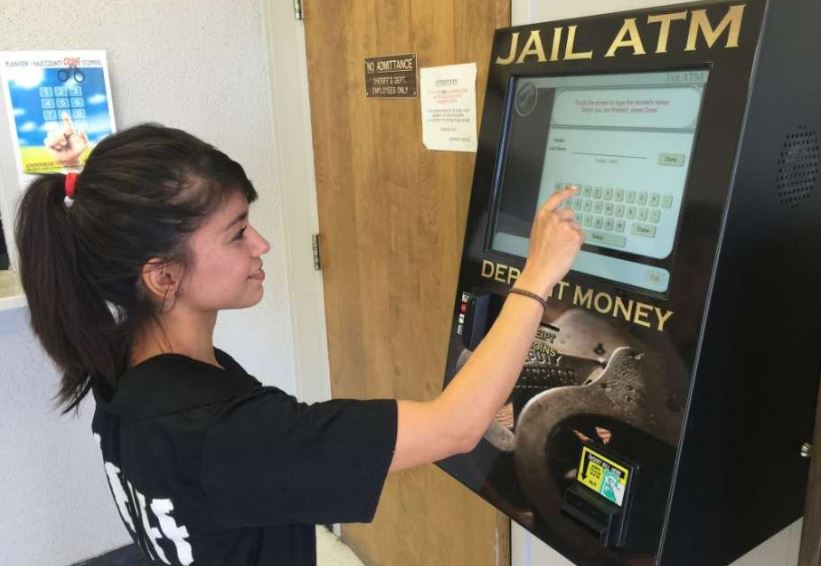
There is a monthly limit of $200-300 on how much inmates can spend on commissary items.
This amount is subject to change so call the facility at 575-542-3050 in order to confirm the amount that cannot be exceeded.
Inmates have access to both an in-house commissary store, and commissary packages that can be purchased and shipped to the inmate by friends and family.
Scroll down for information on the Hidalgo County Jail & Detention Center's service they use for you being able to purchase commissary items online and have them shipped directly to the inmate.
You can also go to our Inmate Money page for information on how to send money to an inmate.
JailATM provides a secure electronic payment portal that allows friends and family members to deposit funds directly into an incarcerated person's jail trust and commissary account. Deposited money provides the financial balance needed for your loved one to purchase personal hygiene items, snacks, over-the-counter medical sundries, and correspondence supplies from the facility commissary.
Important: Facility Deposit Rules and Window Intake Vary
Once a person is booked and moved to a housing unit, facilities do not always allow cash drop-offs or phone payments directly to the jail window. Some might and you should confirm this by calling the facility and asking. But if you do not register online and fund your loved one's trust account immediately, they may be forced to wait days or weeks for standard paper processing, leaving them without essential soap, clean undergarments, basic medical sundries or snacks.
Step-by-Step Instructions to Register and Deposit Funds
- Obtain the inmate's legal first and last name, date of birth, and assigned facility booking ID number.
- Navigate to deposits.jailatm.com/webdeposits/ on your computer or mobile device.
- Click Sign In or Register to set up your verified user account using your email address and password.
- Select the state and the detention facility where the inmate is currently housed.
- Search for the inmate using their ID number or legal last name to confirm an exact roster match.
- Enter your desired deposit dollar amount and review the calculated transaction and convenience fees.
- Input your debit or credit card billing details, complete payment authorization, and save your digital receipt.
What the Inmate Needs to Do
The inmate does not need an internet account to receive funds. Once the electronic transaction clears, the balance posts directly to their jail trust ledger according to facility accounting schedules. The inmate can review their updated balance at a dayroom pod kiosk or on their weekly trust statement and place orders on their regular commissary day.
Official Provider: JailATM Official Website
Customer Service Telephone: 1-877-810-0614
Support Hours: Monday – Friday, 8:00 AM – 5:00 PM CST
Supported Languages: English and Spanish
Other Services Provided by JailATM
In addition to Trust & Commissary Money Deposits, JailATM provides several other communication, store, and visitation services at participating facilities:
- Commissary Gift Packs & Store Ordering: Order pre-approved snack boxes, food packages, and hygiene bundles sent directly to the jail.
• Learn more on our website: Commissary Gift Packs Guide | • Visit official vendor page: JailATM Store Orders - Digital Messaging & Picture Sharing: Send electronic messages and photos directly to an inmate's housing unit kiosk.
• Learn more on our website: Digital Messaging Guide | • Visit official vendor page: JailATM Messaging - Remote Video Visitation: Schedule and join live video visits from home using your computer or smartphone.
• Learn more on our website: Video Visitation Guide | • Visit official vendor page: JailATM Video Visits
Deposit Money for an Inmate in the Hidalgo County Jail & Detention Center
The Easiest and Securest Way of Depositing Money for an Inmate
There are several methods for depositing money on an inmate's account:
1. To send money online to an inmate in the Hidalgo County Jail & Detention Center use Jail ATM.
.png)
2. If you prefer to use your credit or debit card and deposit money over the phone, you can call them at 877-810-0914.
3. Some jails also have a JailATM kiosk for cash or card deposits. Call the Hidalgo County Jail & Detention Center at 575-542-3050 to ask whether it has one and where it is.
4. The Hidalgo County Jail & Detention Center may also allow you to *mail an inmate a money order or cashier’s check from a trusted source such as the Post Office, a local bank, or Western Union. Ask the jail who the money order should be made out to and what to write on it. To confirm this option call the facility at 575-542-3050.
*When mailing a money order or cashier’s check, send it an envelope by itself. Never send it with a letter or photos for your inmate, unless the facility allows it. Never send personal checks or cash.
5. To ask whether the Hidalgo County Jail & Detention Center takes deposits in person, and when, call 575-542-3050.
The Hidalgo County Detention Center on Old U.S. 70 in Lordsburg holds people waiting for trial and people sentenced to serve time there. All mail goes to the jail's post office box in Lordsburg, where staff open and inspect it for contraband and anything obscene. Assume every word will be read.
Personal mail, legal mail and publications:
Inmate's Full Name & Inmate ID #
Hidalgo County Detention Center
PO Box 339
Lordsburg, NM 88045
- Photos: Real photographs may be sent, but never Polaroids.
- Books, newspapers and magazines: New only, mailed by the publisher to the post office box. No hardcover books and no wire spiral bindings. Titles dealing with violence, sex, gangs, drugs or escaping are returned to the sender.
- Return address: Write your name and address in the top left corner, or the letter may be destroyed.
- What to write with: Use a blue or black pen. Felt-tip markers, crayon, colored ink, lipstick marks and perfume all get a letter rejected.
- Extras: An envelope with drawings on it, or with glitter, confetti or other loose items inside, breaks the rules.
- Greeting cards: Plain ones only, never musical.
- Packages: A box packed at home will not be accepted at the Lordsburg jail. Approved items ship only from the jail's commissary provider.
- Stamps: Not allowed in the mail. Send money so the inmate can buy them instead.
- Contraband: Lordsburg staff refer any drugs, weapons or other illegal items found in mail to the sheriff or district attorney, and whoever sent them should expect to be prosecuted.
- Who can write: Friends and relatives may write, with weekday delivery and no limit on volume. Co-defendants, people jailed elsewhere and anyone under a no-contact order may not.
- Electronic messages: Hidalgo County inmates can also get electronic messages. Attached pictures must be .jpg, .jpeg or .png files, staff review them, and rejected messages are not refunded.
Securus AdvanceConnect is a prepaid calling account that links directly to your mobile phone or landline number, allowing you to receive outbound calls from an incarcerated individual. Because correctional phone systems never allow incoming calls, funding an AdvanceConnect balance ensures calls are accepted immediately without being blocked by cell carriers.
Important: Mobile Networks Block Inmate Calls Without Prepaid Funds
Correctional facilities do not allow collect billing to cell phones, and mobile carriers automatically block incoming collect calls from detention centers. While some residential landlines may allow direct billing, mobile phones and VoIP services require an active prepaid AdvanceConnect balance, which you can verify with your phone provider. If you do not register online and fund your account right away, your loved one will hear an automated error message stating that your number cannot accept calls.
Step-by-Step Instructions to Register and Fund AdvanceConnect
- Go to securustech.online or open the Securus mobile app.
- Select Sign Up and create your account using your 10-digit telephone number and email address.
- Search for your facility by state and agency name, then add the inmate using their full legal name or booking ID.
- Select AdvanceConnect under calling accounts.
- Choose your deposit amount, review convenience and transaction fees, and enter your credit or debit card billing details.
- Authorize payment and confirm that your mobile phone allows calls from automated or unknown correctional numbers.
What the Inmate Needs to Do
The inmate picks up any dayroom phone or logs onto their handheld tablet, dials your 10-digit number, and enters their assigned PIN. The automated system verifies that your AdvanceConnect account has an active balance and connects the call. All calls are subject to recording and monitoring by facility staff.
Official Provider: Securus Technologies Official Website
Customer Service Telephone: 1-800-844-6591
Support Hours: 24 hours a day, 7 days a week, 365 days a year
Supported Languages: English and Spanish
Other Services Provided by Securus Technologies
In addition to AdvanceConnect Prepaid Calling, Securus Technologies and its subsidiary JPay provide several other communication, financial, and visitation services:
- Direct Bill Phone Calling: Establish a monthly billed calling account for verified landline numbers.
• Learn more on our website: Direct Bill Phone Calling Guide | • Visit official vendor page: Securus Direct Bill - Securus Video Connect: Schedule and join live video visits from home using your computer or smartphone.
• Learn more on our website: Video Visitation Guide | • Visit official vendor page: Securus Video Connect - JPay Money Deposits (Trust & Canteen): Send money directly into an inmate's jail trust account for commissary store purchases.
• Learn more on our website: Money Deposits Guide | • Visit official vendor page: JPay Money Transfers - JPay Email Messaging & Photos: Send electronic messages, photo attachments, and VideoGrams directly to their tablet or kiosk.
• Learn more on our website: Email Messaging Guide | • Visit official vendor page: JPay Email Services
Securus Direct Bill is an invoiced telephone calling service designed for approved residential landlines, law offices, and commercial businesses. Instead of prepaying funds in advance, calls received from an incarcerated individual are billed directly to your account on a monthly itemized billing invoice.
Important: Direct Bill Requires Credit Approval and Qualifying Lines
Direct Bill is not available for mobile cell phones, internet VoIP numbers, or customers with poor or unestablished telephone credit history. Correctional facilities enforce strict telecommunications billing rules, which you can verify by calling Securus customer care. If your line does not meet credit approval standards, you must open an AdvanceConnect prepaid account instead to receive incoming calls from your loved one.
Step-by-Step Instructions to Set Up a Direct Bill Account
- Contact Securus customer service at 1-800-844-6591 or submit an application via securustech.net.
- Provide your billing name, service address, and qualifying residential or business landline telephone number.
- Submit to a standard credit evaluation performed by Securus to determine billing eligibility.
- Establish your authorized monthly credit limit upon approval.
- When your phone rings with a call from the detention center, follow the recorded operator instructions and press the requested key to accept charges.
- Pay your monthly billing invoice online, by phone, or through the mail.
What the Inmate Needs to Do
The inmate dials your phone number from any dayroom telephone and keys in their assigned PIN. The automated system verifies that your account is in good standing and has not exceeded its monthly spending ceiling before connecting the call. All non-privileged conversations are recorded and monitored.
Official Provider: Securus Technologies Official Website
Customer Service Telephone: 1-800-844-6591
Support Hours: 24 hours a day, 7 days a week, 365 days a year
Supported Languages: English and Spanish
Other Services Provided by Securus Technologies
In addition to Direct Bill Calling, Securus and its subsidiary JPay offer several other communication, financial, and visitation services:
- AdvanceConnect Prepaid Calling: Fund a prepaid calling account tied to your mobile phone number.
• Learn more on our website: AdvanceConnect Calling Guide | • Visit official vendor page: Securus AdvanceConnect - Securus Video Connect: Schedule and join live video visits from home using your computer or smartphone.
• Learn more on our website: Video Visitation Guide | • Visit official vendor page: Securus Video Connect - JPay Money Deposits (Trust & Canteen): Send money directly into an inmate's jail trust account for commissary store purchases.
• Learn more on our website: Money Deposits Guide | • Visit official vendor page: JPay Money Transfers - JPay Email Messaging & Photos: Send electronic letters, photos, and VideoGrams directly to their tablet or kiosk.
• Learn more on our website: Email Messaging Guide | • Visit official vendor page: JPay Email Services
Securus eMessaging provides a digital messaging service that allows family members to send electronic letters, digital photos, and eCards directly to an incarcerated loved one via handheld tablets and housing unit kiosks. Messages are screened electronically, delivering communication within hours instead of waiting days for postal mail delivery.
Important: Physical Mail Bans and Stamp Requirements Vary
Inmates cannot receive incoming phone calls, and traditional postal mail rules differ across correctional systems. While some jails continue to accept handwritten letters, many facilities have transitioned entirely to electronic messaging or digital mail scanning, which you can verify by checking facility rules. If you do not register online and purchase eMessaging stamps right away, your loved one may face lengthy periods without direct written contact from family.
Step-by-Step Instructions to Register and Send eMessages
- Go to securustech.online or open the Securus mobile app.
- Sign into your verified profile or create an account with your email and phone number.
- Select eMessaging from your service dashboard.
- Link the inmate to your account by selecting the facility and entering their legal name or booking ID.
- Purchase an eMessaging stamp book using a debit or credit card.
- Type your message in the editor, attach photos or eCards if permitted, and optionally include a prepaid reply stamp.
- Submit your message to the facility's screening queue.
What the Inmate Needs to Do
All electronic correspondence is screened by correctional staff before delivery. Once approved, the message arrives in the inmate's inbox on their assigned Securus tablet or housing unit kiosk. The inmate opens the message, views attached photos, and drafts an electronic reply using their available stamp balance.
Official Provider: Securus Technologies Official Website
Customer Service Telephone: 1-800-844-6591
Support Hours: 24 hours a day, 7 days a week, 365 days a year
Supported Languages: English and Spanish
Other Services Provided by Securus Technologies
In addition to eMessaging, Securus provides calling, video visitation, and trust money services:
- AdvanceConnect Prepaid Calling: Prepay for phone calling credits so your loved one can call your mobile phone directly.
• Learn more on our website: AdvanceConnect Calling Guide | • Visit official vendor page: Securus AdvanceConnect - Securus Video Connect: Schedule and join live video visits from home using your computer or smartphone.
• Learn more on our website: Video Visitation Guide | • Visit official vendor page: Securus Video Connect - JPay Money Deposits (Partner Trust Transfers): Send money directly into an inmate's jail trust account for commissary shopping.
• Learn more on our website: Money Deposits Guide | • Visit official vendor page: JPay Money Transfers
Securus Technologies (Aventiv) deploys secure, corrections-grade community tablets to incarcerated individuals across state prison systems and county jails. Operating over a private, encrypted facility network, these devices provide access to digital messaging (eMessaging), phone calls, educational courses, job search tools, eBooks, podcasts, and streaming music directly from housing units.
Important: Tablet Hardware Deployment and Rental Rules Vary
Detention centers do not manage tablet distribution identically. While some agencies issue individual personal tablets to every detainee at booking, others utilize shared pod docking stations or restrict tablet use to specific dayroom hours, which you should confirm with the facility directly. Although core educational and legal resources are generally provided free of charge, sending messages, listening to music, or making phone calls from the tablet requires an active balance funded by outside contacts.
Step-by-Step Instructions to Support and Fund Securus Tablets
- Verify that Securus handheld tablets are deployed at your loved one's specific facility.
- Log into your account at securustech.online or launch the Securus mobile app.
- Ensure the inmate is linked to your contact list using their legal name and booking ID number.
- Purchase eMessaging Stamps for digital messaging, fund an AdvanceConnect account for phone calls, or deposit funds into their Inmate Debit account for music and media.
- Review all transaction charges, complete payment with a credit or debit card, and save your confirmation receipt.
- Notify your loved one that funds have posted so they can access their media and communication apps.
What the Inmate Needs to Do
The inmate unlocks their assigned tablet using their facility PIN or biometric verification. They can access free rehabilitative and educational materials at no charge, or open communication and media applications to draft messages, place phone calls, or stream music using available balances. Devices are docked during quiet hours and shift changes for secure recharging and data synchronization.
Official Provider: Securus Technologies Official Website
Customer Service Telephone: 1-800-844-6591
Support Hours: 24 hours a day, 7 days a week, 365 days a year
Supported Languages: English and Spanish
Other Services Provided by Securus Technologies
In addition to Tablet Services, Securus provides calling, messaging, video visitation, and trust money transfers:
- eMessaging & Digital Mail: Send electronic messages, photo attachments, and eCards directly to an inmate's tablet.
• Learn more on our website: eMessaging Guide | • Visit official vendor page: Securus eMessaging - AdvanceConnect Prepaid Calling: Prepay for phone calling credits so your loved one can call your telephone directly.
• Learn more on our website: AdvanceConnect Calling Guide | • Visit official vendor page: Securus AdvanceConnect - Securus Video Connect: Schedule and join live video visits from home using your computer or smartphone.
• Learn more on our website: Video Visitation Guide | • Visit official vendor page: Securus Video Connect - JPay Money Deposits (Partner Trust Transfers): Send money directly into an inmate's jail trust account for commissary shopping.
• Learn more on our website: Money Deposits Guide | • Visit official vendor page: JPay Money Transfers
Nearby counties
- Jail (Main): 575-542-3050
- Sheriff: 575-542-3833
The Hidalgo County Jail & Detention Center serves the following cities and towns of Hidalgo County: Animas, Lordsburg and Virden.