
San Juan County Adult Detention Center
San Juan County Adult Detention Center
Physical Address
871 Andrea DriveFarmington, NM 87401
Jail Phone Number
505-566-4500San Juan County Inmate Search and Booking Information
Find someone in custody in San Juan County. Open the official inmate lookup. Use the county’s Inmate Inquiry. Search by name, subject number or booking number. Use the In Custody filter for someone you believe is currently held. Clear the filter if you are looking for an older booking, then compare the booking date and facility.
The county says the inquiry can display charges, bond and booking photos. If police in Farmington, Aztec or Bloomfield made the arrest and there is no match, ask where they took the person. A Navajo Nation arrest may require a separate tribal contact.
Before you visit or send money: Confirm where the person is held and ask for the booking or inmate number. Use the county’s detention page for online visit scheduling. Confirm the adult booking number before you set up a visit or account.
Read inmate search answers
 Read inmate search answers
1. How do I find someone in custody in San Juan County?
Open the official inmate lookup. Use the county’s Inmate Inquiry. Search by name, subject number or booking number. Use the In Custody filter for someone you believe is currently held. Clear the filter if you are looking for an older booking, then compare the booking date and facility. Write down the facility, booking or inmate number and the time you confirmed custody. Keep any court case number separate.
↑ Back to the question list2. Who can I call to check a booking?
Contact San Juan County Adult Detention Center at 871 Andrea Drive, Farmington. Call 505-566-4500. Start with the full name, date of birth, approximate arrest date and the city or agency involved. If you already have a booking number, give that first. Official contact and facility information.
↑ Back to the question list3. What if the person does not show up?
Check spelling, hyphens, both surnames and the name used at arrest. With a recent arrest, ask whether intake is complete. If the jail has no record, ask the arresting agency where the person was taken and call that facility. A missing entry by itself does not establish a release.
↑ Back to the question list4. How can I find out if they went to another jail?
The county says the inquiry can display charges, bond and booking photos. If police in Farmington, Aztec or Bloomfield made the arrest and there is no match, ask where they took the person. A Navajo Nation arrest may require a separate tribal contact. Ask when the person arrived or whether they were transferred, and get the receiving jail’s phone number. Call the receiving jail to confirm it accepted the person before arranging a ride, mailing anything or depositing money.
↑ Back to the question list5. Can I see a booking photo or mugshot?
The county’s Inmate Inquiry can include a booking photo. Confirm the booking date and identifier before relying on a photo. A booking record shows an arrest or intake. The court record is where to check how a charge was resolved.
↑ Back to the question list6. How do I check for an active warrant?
Contact the agency or court that may have issued the warrant. Give the person’s full name and the case number if you have it. The New Mexico Courts public case search can help identify a case and its court, but a missing entry or an old jail listing cannot confirm whether a warrant is active.
↑ Back to the question list7. Where can I see the charges and next court date?
Write down the charge names and any case number you find in the booking record. Search New Mexico Courts public case search and call the clerk listed for that case to confirm the hearing time, courthouse and any public access instructions. For local court contacts, see the JailExchange court guide.
↑ Back to the question list8. Who can tell me whether bond was set or when they will be released?
For a local criminal case, confirm the latest release order with the court and ask the housing jail how it processes the order. A payment can still leave a separate hold to resolve, so ask about pickup before driving. Use the JailExchange bail guide for local contacts and procedures.
↑ Back to the question list9. Can I get a release or transfer notification?
Check New Mexico VINE or call 877-551-8463. If you can locate the record, follow the enrollment steps and keep your contact information current. If the service cannot find the person, ask the holding agency about its custody updates and victim notification process.
↑ Back to the question list10. How can I talk to someone in custody?
Ask the confirmed facility which phone service it uses and whether the person needs your number on an approved list. Ask how they can place an outgoing call. If a call is blocked, confirm the facility and account type before buying more credit. Ask counsel how to arrange a confidential legal call.
↑ Back to the question list11. How can I set up a visit?
Use the county’s detention page for online visit scheduling. Confirm the adult booking number before you set up a visit or account. Ask whether you need an appointment, photo ID, visitor approval or special paperwork to bring a child. Confirm the exact address and visit type before leaving home.
↑ Back to the question list12. Where do I send letters or photographs?
Ask for the personal-mail address and the exact format for the person’s name, ID and return address. Some facilities use a separate mail processor. Ask what photographs, cards or other enclosures they accept before sending anything.
↑ Back to the question list13. How do I send money to the right account?
Use the vendor linked by the confirmed facility. Match the facility name, person and ID before paying. Commissary, phone credit and court bond can go through separate systems. If they have moved, check the new facility’s instructions before using the old account.
↑ Back to the question list14. Who do I contact with an urgent health or safety concern?
Call the facility holding the person and ask for the shift supervisor or medical unit. Give the full name, booking number and the specific concern, including any time-sensitive medication. Staff may be able to take the information even if they cannot discuss treatment with you.
↑ Back to the question list15. How do I search state prison, federal or immigration custody?
The New Mexico Corrections Department offender search covers state prison and supervision records. Check the listed status and location. For federal prison custody use the Federal Bureau of Prisons locator. For a recent federal arrest without a locator result, ask the arresting agency or counsel which facility is holding the person. For immigration detention, use the ICE Online Detainee Locator with the A-number and country of birth, or the name and country of birth. For a tribal arrest or a child’s arrest, ask the arresting agency directly about the correct facility and records process.
↑ Back to the question listSan Juan County bail and bond: Farmington, Aztec, Bloomfield and Shiprock
When state or local officers arrest someone in Farmington, Aztec, Bloomfield, Kirtland or Shiprock, the person is held at the San Juan County Adult Detention Center, 871 Andrea Dr., Farmington, 505-566-4500.
Start with the San Juan County Inmate Search.
Before paying, ask the court or jail which release order applies and where payment is accepted.
1. How do I set up a video visit?
Since Jan. 20, 2026, every visitor must register and be approved first at sanjuannm.gtlvisitme.com. All visits are online and scheduled. There are no calls or visits from 6 to 7:30 p.m. or from 9:30 p.m. to 7 a.m. (county page).
2. How can I add money to an account?
Use the lobby kiosk (cash, debit or credit), pay online or by phone with the CHJ number, or bring a postal money order to the commissary window on weekdays, 8 to 5. Money orders may take 72 hours to post (detention page).
3. Does the county have pretrial services?
Yes. Pre-Trial Services is at 505-334-9095 (county page).
4. Is there a Farmington bail chart?
It can't be (Rule 5-401, part E). A petty charge sometimes ends with release on a promise from the jail; DWI cases see a judge (Rule 6-408).
5. What are the time limits?
Probable cause in 48 hours (Rule 6-203); a release hearing in 3 days (Rule 5-401).
6. When does a judge here require money?
Only with written reasons, and only after cheaper steps. The 10% deposit comes before a property bond, which comes before a full bond (Rule 5-401). A licensed bondsman may post a full bond (license lookup).
7. Is no-bail detention possible?
For a felony, if the district attorney wins a hearing on it (constitution; Rule 5-409).
8. Which courts hear Farmington and Aztec cases?
Magistrate courts: 200 Gossett Drive, Aztec, 505-334-9479, and 950 W. Apache St., Farmington, 505-326-4338 (court list). The Eleventh Judicial District has offices in Aztec, 505-334-6151, and Farmington, 505-326-2256.
9. Which public defender office serves Farmington?
In Aztec, 300 Gossett Drive, 505-386-4060 (LOPD).
10. Is there a youth detention center in the county?
Yes, a certified one run by the county: 100 S. Oliver Dr., Aztec, 505-324-5800 (CYFD). Timelines come from the Children's Code (NMSA 32A-2-13).
11. What if the arrest was in Shiprock or on Navajo land?
Navajo police and courts may handle it. The Shiprock District Court is 505-368-1270 (Navajo Judicial Branch). Tribal release rules apply, and serious crimes by Native Americans there may be charged federally in Albuquerque, 505-348-2000 (18 U.S.C. 1153).
12. Who confirms the bond amount?
The jail, 505-566-4500.
San Juan County bail contacts
- Jail
- 871 Andrea Dr., Farmington; 505-566-4500
- Magistrate courts
- Aztec 505-334-9479; Farmington 505-326-4338
- Public defender
- 505-386-4060
- Inmate search
- San Juan County Inmate Search
San Juan County Adult Detention Center ON-SITE (at the jail) VIDEO VISITATION SCHEDULE
871 Andrea Drive
Farmington, NM 87401
505-566-4500
Schedule Video Visits online with gettingout

- Visits are 15 & 30 minutes.
- Visitation schedule subject to change.
- Inmates are allowed two visits per week
- A maximum of 2 guests are allowed per an on-site video session.
| DAY | TIME |
| SUNDAY | call jail for on-site visit times |
| MONDAY | call jail for on-site visit times |
| TUESDAY | call jail for on-site visit times |
| WEDNESDAY | call jail for on-site visit times |
| THURSDAY | call jail for on-site visit times |
| FRIDAY | call jail for on-site visit times |
| SATURDAY | call jail for on-site visit times |
San Juan County Adult Detention Center REMOTE (at home) VIDEO VISITATION SCHEDULE
- All visits must be scheduled at least 24 hours in advance.
- Visitation Schedule subject to change.
| DAY | TIME |
| SUNDAY | 7:00 AM - 9:15PM |
| MONDAY | 7:00 AM - 9:15PM |
| TUESDAY | 7:00 AM - 9:15PM |
| WEDNESDAY | 7:00 AM - 9:15PM |
| THURSDAY | 7:00 AM - 9:15PM |
| FRIDAY | 7:00 AM - 9:15PM |
| SATURDAY | 7:00 AM - 9:15PM |
GettingOut / ViaPath Remote Video Visits
Provider: GettingOut (Telmate) • Rebranding as ViaPath Technologies (myViaPath Visits)

GettingOut Video Visitation allows friends and family members to conduct live, face-to-face video visits with incarcerated loved ones using a personal computer, laptop webcam, or the mobile application. Telmate and GTL operate under ViaPath Technologies, and the visiting service is transitioning from GettingOut Visits to myViaPath Visits; users may encounter either brand name depending on whether their county jail has completed the platform update.
Important: Advance Background Clearance Required
Detention centers do not permit unapproved drop-in video visitation. All visitors must submit valid government photo identification and pass administrative screening before an appointment can be booked, a review that can take up to 48 hours depending on facility staffing. You should verify your visitor approval status with the facility in advance. If you do not register ahead of time, you will miss your loved one's scheduled visiting slots for the week.
Step-by-Step Instructions to Schedule a Video Visit
- Open the GettingOut / myViaPath Visits app or go to www.gettingout.com / my.viapath.com.
- Register your profile and upload clear photographs of your government ID and a verification photo.
- Wait for the facility to issue visitor approval (you will receive an email confirmation).
- Select Schedule Visit, pick your detention facility, and select the inmate.
- Choose an available 25- or 30-minute time slot from the calendar and pay the visitation fee using a credit or debit card.
- Sign into the app or website 10 minutes prior to the start time on a device with a functioning camera, microphone, and stable internet connection.
What the Inmate Needs to Do
The inmate receives a schedule alert on their housing unit video kiosk or personal tablet. At the appointed time, they log in with their PIN and sit in front of the terminal. Inmates must follow institutional dress and conduct rules; corrections staff actively monitor sessions and will terminate any call immediately if rules are broken.
Official Providers: GettingOut Visits | myViaPath Visits
Customer Service Telephone: 1-866-516-0115 (GettingOut) • 1-877-650-4249 (ViaPath)
Support Hours: Monday – Friday, 7:00 AM – 11:00 PM CST; Saturday – Sunday, 8:00 AM – 7:00 PM CST
Supported Languages: English and Spanish
Other Services Provided by GettingOut / ViaPath
In addition to Remote Video Visits, GettingOut and ViaPath provide several other communication and financial options:
- Two-Way Text Messaging: Send electronic messages and photos straight to the inmate's screen.
• Learn more on our website: Two-Way Text Messaging Guide | • Visit official vendor page: GettingOut Messaging - Inmate Tablet Rentals & Content: Provide funds for educational modules, music streaming, and news.
• Learn more on our website: Tablet Rentals & Content Guide | • Visit official vendor page: GettingOut Tablets - AdvancePay Phone Calling: Keep a funded prepaid balance to receive calls directly on your phone.
• Learn more on our website: AdvancePay Phone Calling Guide | • Visit official vendor page: ViaPath ConnectNetwork Calling - Inmate Trust Deposits: Transfer money directly into their jail trust account for canteen goods.
• Learn more on our website: Inmate Trust Deposits Guide | • Visit official vendor page: ViaPath Trust Deposits
San Juan County Criminal Courts in Aztec and Farmington
San Juan County, in the Four Corners, has state courts in two cities: Aztec, the county seat, and Farmington, the largest city.
A large share of the county is Navajo Nation land, and the Ute Mountain Ute Reservation reaches into the northwest corner.
San Juan is Division I of the Eleventh Judicial District; McKinley County is Division II.
1. After a San Juan County arrest, where is the person taken?
- Aztec Magistrate Court, 200 Gossett Dr., Aztec, NM 87410: (505) 334-9479
- Farmington Magistrate Court, 950 W. Apache St., Farmington, NM 87401: (505) 326-4338
- Eleventh Judicial District Court, Aztec, 103 S. Oliver Dr.: (505) 334-6151
- Eleventh Judicial District Court, Farmington, 851 Andrea Dr.: (505) 326-2256
- Eleventh Judicial District Attorney, Division I, 335 S. Miller Ave., Farmington: (505) 599-9810
- Law Offices of the Public Defender, Aztec, 300 Gossett Dr.: (505) 386-4060
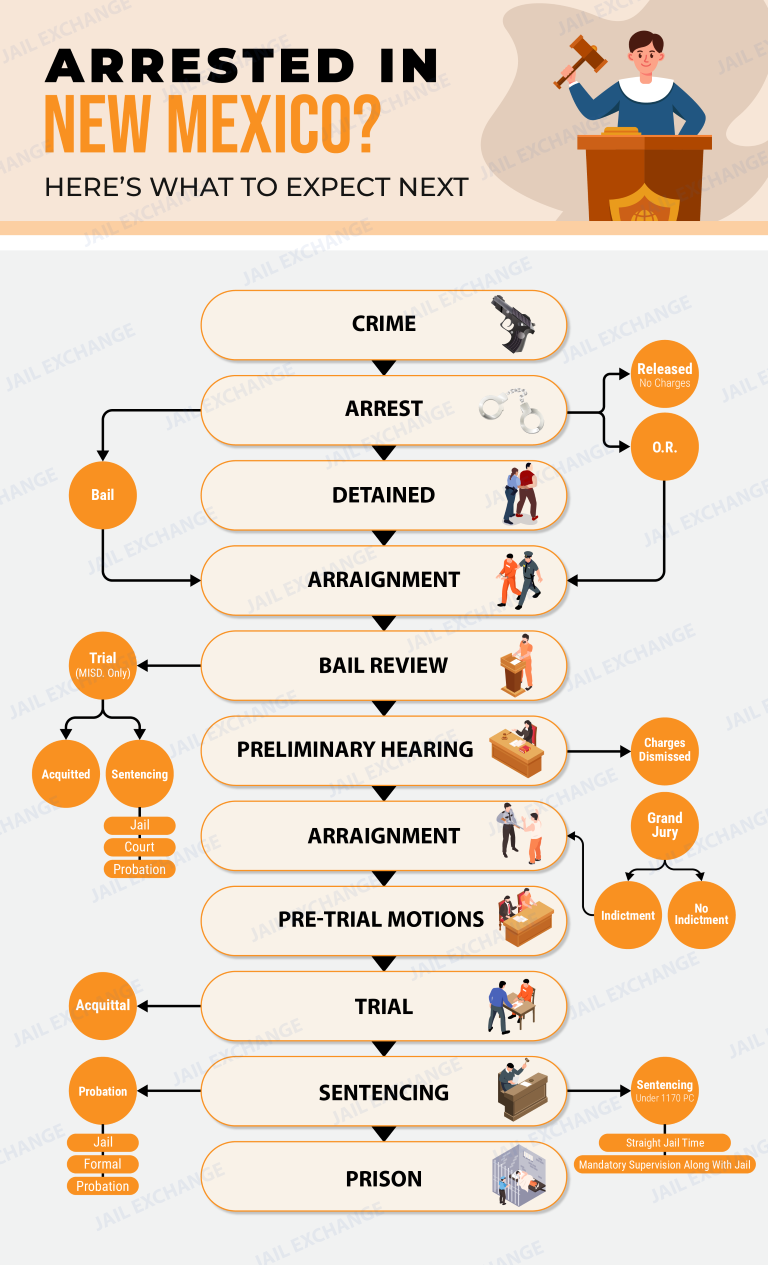
Adults are taken to the county adult detention center for booking. To learn whether someone is there, try the San Juan County Inmate Search. Officers who acted without a warrant need a judge to approve probable cause within two days. A first appearance in the Aztec or Farmington magistrate court follows, where conditions of release are decided.
↑ Back to the question list
2. Which magistrate court will hear a San Juan County case?
That depends mostly on where the offense took place. The Farmington court sees many city and west-county cases, while Aztec takes the eastern side. Both try state misdemeanors such as DWI, assault and larceny, with six jurors if the defendant asks, and both open felony files. City codes are enforced in the Farmington, Aztec and Bloomfield municipal courts: (505) 599-1247, (505) 334-7640 and (505) 632-6330.
↑ Back to the question list
3. How does pretrial detention work in San Juan County?
Conditions are the default, but in a felony the prosecutor may move to detain. Five days is the limit for opening that hearing once the motion is filed. To win, the state has to show by clear and convincing evidence that this defendant poses a danger to others and that release terms can't reasonably manage it.
↑ Back to the question list
4. How do felony cases proceed in San Juan County?
Grand jury indictments are one path; preliminary hearings are the other. A defendant who is locked up should get the hearing within 10 days, and one who is free, within 60. Bound-over cases are filed in the Eleventh Judicial District Court, which holds court in both Aztec and Farmington.
↑ Back to the question list
5. Where is the public defender for San Juan County?
The Law Offices of the Public Defender has an office on Gossett Drive in Aztec, near the magistrate court. Defendants who can't afford a lawyer can apply there or ask the judge at their first appearance.
↑ Back to the question list
6. What sentences and appeals apply?
A felony trial uses a 12-person jury. Basic New Mexico prison terms run, by degree, from 18 months for fourth-degree felonies to 18 years for first-degree felonies. Misdemeanors bring at most 364 days. A magistrate court conviction can be appealed within 15 days to district court, which hears the case again from the start. A felony judgment can be appealed within 30 days to the New Mexico Court of Appeals.
↑ Back to the question list
7. How do Navajo Nation and federal cases fit in?
Navajo Nation courts handle many offenses by Native people on the reservation. Serious crimes there involving Native Americans fall under the federal Major Crimes Act and go to the U.S. District Court for the District of New Mexico, usually in Albuquerque at 333 Lomas Blvd. NW, (505) 348-2000.
↑ Back to the question list
8. Where can I find a San Juan County state case online?
New Mexico Courts Case Lookup covers both magistrate courts and the district court. Tribal and federal cases aren't included.
↑ Back to the question list
9. What number confirms a San Juan County court date?
Contact the court where the case sits: Aztec Magistrate (505) 334-9479, Farmington Magistrate (505) 326-4338, or the district court in Aztec (505) 334-6151 or Farmington (505) 326-2256. This guide doesn't replace advice from a lawyer.
↑ Back to the question list

Access Securepak is an authorized correctional commissary care-package program that allows families to purchase customized food, snack, hygiene, apparel, and electronics packages sent directly to an incarcerated loved one. Every package is custom-packed to meet the strict security regulations of the specific jail or state prison.
Important: Delivery Schedules and Package Quotas
Jail package guidelines are not uniform across detention centers. Some facilities permit orders year-round, while others restrict deliveries to quarterly cycles or strict weekly deadlines that you should confirm with the facility directly. If you delay setting up your account, you risk missing the upcoming delivery cutoff, leaving your loved one waiting an extra cycle for fresh food, warm thermals, or personal toiletries.
Step-by-Step Instructions to Register and Access Service
- Visit the official Access Securepak online store at www.accesscatalog.com.
- Select the state and the specific jail or correctional institution from the dropdown menu.
- Enter the inmate's legal last name and inmate ID to verify their active housing and package eligibility.
- Browse the catalog of approved meats, cheeses, ramen soups, cookies, toiletries, and clothing.
- Add items to your cart up to the facility's maximum weight or dollar limit (usually $50 to $125 per order).
- Check out using your debit or credit card and save the order confirmation tracking number.
What the Inmate Needs to Do
The inmate does not need to order anything themselves. Securepak ships the sealed package directly to the correctional facility's commissary warehouse. Jail staff inspect the box and deliver it to the inmate during regular pod commissary distribution, where the inmate signs for the package.
Official Provider: Access Corrections / Keefe Group Official Website
Customer Service Telephone: 1-800-546-6283
Support Hours: Monday – Friday, 8:30 AM – 11:30 PM EST; Saturday, 11:00 AM – 5:00 PM EST
Supported Languages: English and Spanish
Other Services Provided by Access Corrections / Keefe Group
In addition to Access Securepak (Commissary & Gift Packages), Access Corrections / Keefe Group provides several other communication, financial, and visitation services at participating correctional facilities:
- Inmate Trust Money Deposits: Send cash directly to their personal account so they can buy items independently.
• Learn more on our website: Inmate Trust Money Deposits Guide | • Visit official vendor page: Access Corrections / Keefe Group Inmate Trust Money Deposits - Digital Messaging & Photos: Send fast electronic letters and digital pictures to their tablet.
• Learn more on our website: Digital Messaging & Photos Guide | • Visit official vendor page: Access Corrections / Keefe Group Digital Messaging & Photos
Buy Commissary for an Inmate in the San Juan County Adult Detention Center
San Juan County Adult Detention Center Inmate Commissary - Sending Money or Purchasing Commissary for an Inmate
San Juan County Adult Detention Center allows inmates to purchase commissary. Ask the jail what its commissary sells; snacks and hygiene items are common.
You can buy commissary for an inmate using an online service called Access Securepak.

Call the facility at 505-566-4500 to ask whether there is a limit on how much an inmate can spend on commissary.
Access Securepak's site shows whether friends and family can order commissary for an inmate at this jail.
Scroll down for information on the San Juan County Adult Detention Center's service they use for you being able to purchase commissary items online and have them shipped directly to the inmate.
You can also go to our Inmate Money page for information on how to send money to an inmate.
Access Secure Deposits (Smart Deposit) allows families and friends to securely transfer money directly into an incarcerated person's jail trust account using a debit or credit card. Deposited funds become immediately available for your loved one to purchase essential hygiene goods, over-the-counter medication, food items, and writing materials from the facility commissary.
Important: Inmate Banking Policies Vary by Facility
Once a person is booked and moved to a cell, facilities do not always allow cash drop-offs or phone payments directly to the jail. Some might and you should confirm this by calling the facility and asking. But if you do not register online and fund your loved one's trust account immediately, they may be forced to wait days or weeks for standard paper processing, leaving them without essential soap, clean undergarments, basic medical sundries or snacks.
Step-by-Step Instructions to Register and Access Service
- Obtain the inmate's legal first and last name, date of birth, and official six- to ten-digit Booking or Inmate ID number.
- Visit the official Access Corrections portal at www.accesscorrections.com or download the Access Corrections mobile app.
- Select the state and the exact detention facility or county jail where the inmate is currently housed.
- Add the inmate as a contact and confirm their identity from the facility roster.
- Enter your debit or credit card billing information, choose your deposit amount, review the facility processing fee, and submit your payment.
- Save and print your transaction confirmation number for verification.
What the Inmate Needs to Do
The inmate does not need internet access to receive your deposit. Once approved, the funds post directly to their facility account balance. The inmate can verify their balance at the dayroom kiosk or on their trust statement and start ordering items on the next designated commissary day.
Official Provider: Access Corrections / Keefe Group Official Website
Customer Service Telephone: 1-866-345-1884
Support Hours: 24/7/365
Supported Languages: English and Spanish
Other Services Provided by Access Corrections / Keefe Group
In addition to Access Secure Deposits (Trust Money), Access Corrections / Keefe Group provides several other communication, financial, and visitation services at participating correctional facilities:
- Digital Messaging & Photos: Send digital letters and pictures straight to the inmate's kiosk or tablet.
• Learn more on our website: Digital Messaging & Photos Guide | • Visit official vendor page: Access Corrections / Keefe Group Digital Messaging & Photos - Commissary Care Packages: Order pre-approved food boxes, thermal clothes, and snack bundles directly to the jail.
• Learn more on our website: Commissary Care Packages Guide | • Visit official vendor page: Access Corrections / Keefe Group Commissary Care Packages
Deposit Money for an Inmate in the San Juan County Adult Detention Center
The Easiest and Securest Way of Depositing Money for an Inmate
There are several methods for depositing money on an inmate's account:
1. To send money online to an inmate in the San Juan County Adult Detention Center use Access Corrections.

2. If you prefer to use your credit or debit card and deposit money over the phone, you can call them at 866-345-1884.
3. Some jails have an Access Corrections kiosk for cash or card deposits. Call the San Juan County Adult Detention Center to ask whether it has one and where it is.
4. Access Corrections also has Kiosk machines that you can find in check cashing stores and retail outlets across the country.
5. The San Juan County Adult Detention Center may also allow you to *mail an inmate a money order or cashier’s check from a trusted source such as the Post Office, a local bank, or Western Union. Ask the jail who the money order should be made out to and what to write on it. To confirm this option call the facility at 505-566-4500.
*When mailing a money order or cashier’s check, send it an envelope by itself. Never send it with a letter or photos for your inmate, unless the facility allows it. Never send personal checks or cash.
6. To ask whether the San Juan County Adult Detention Center takes deposits in person, and when, call 505-566-4500.
San Juan County's Adult Detention Center on Andrea Drive in Farmington takes letters, legal papers and publications at one street address. Each piece of mail is opened and searched for drugs, obscene material and other rule breaks before a detainee sees it. The county has a zero-tolerance stance on mail violations, and breaking the rules can cost a detainee their mail privileges.
Everything goes here, legal mail and publications included:
Inmate's Full Name & Inmate ID#
San Juan County Adult Detention Center
871 Andrea Dr.
Farmington, NM 87401
- Return address: Your name and full mailing address belong in the upper left corner of the envelope, or the letter will most likely sit undelivered.
- Greeting cards: Simple, flat cards are allowed. Musical cards are not.
- Books: New books are accepted when a publisher or a store ships them directly. Any book the staff judge too violent, pornographic or obscene gets thrown away.
- Magazines and newspapers: News, sports and special-interest titles are welcome if they arrive new from the publisher. An issue showing weapons, profanity or adult content is held back.
- Writing tools: Farmington staff accept letters written in blue or black ink. Crayon, felt-tip markers, colored ink, lipstick marks and perfume all break the rules.
- Nothing extra: Leave out glitter, confetti and other loose items, and keep drawings off the envelope.
- Stamps: You can't mail stamps in. Detainees buy them through commissary, and those without funds get two or three a week.
- Packages: Only the approved commissary provider can ship items in.
- Who may write: Friends and family. Letters to or from co-defendants, people in other jails or prisons, and anyone under a no-contact order are stopped.
- Delivery: Letters reach detainees on weekdays only, and a detainee may get as many as people care to send.
Detainee information is only given out through the online detainee lookup, so check it before you mail. You can also send electronic messages and photos.
ViaPath AdvancePay Phone Calling Accounts
Provider: ViaPath Technologies • Formerly ConnectNetwork / Global Tel*Link (GTL)
AdvancePay is the primary prepaid telecommunications service operated by Global Tel*Link (GTL) and ConnectNetwork, which have unified under the corporate identity of ViaPath Technologies (and the myViaPath platform). By funding an AdvancePay account, telephone charges are deducted per minute whenever an incarcerated loved one calls your specific telephone number, preventing calls from being rejected by cellular carriers.
Important: Cell Carriers Automatically Block Jail Collect Calls
Inmate telephone networks do not permit incoming calls, and wireless cell providers automatically block traditional collect billing by default. While select traditional landlines may support operator billing, cell phones and internet-based lines require an active AdvancePay balance, which you can verify with your carrier. If you do not register your number online and add funds immediately, your loved one will hear an automated operator announcement stating your line is blocked from receiving correctional calls.
Step-by-Step Instructions to Open and Fund AdvancePay
- Visit web.connectnetwork.com or the updated my.viapath.com portal, or launch the ConnectNetwork / ViaPath mobile application.
- Click Sign Up and register using your primary 10-digit cellphone number and email address.
- Select Add Facility, pick your state, and choose the detention center or state prison where the inmate is held.
- Search for the inmate using their full legal name or facility booking ID number and link them to your contact directory.
- Select AdvancePay Phone and choose your deposit amount ($25, $50, or custom).
- Enter your debit or credit card billing details, accept the administrative transaction fee, and complete the payment.
- Check your phone settings to confirm that automated or unknown correctional numbers are not routed straight to spam.
What the Inmate Needs to Do
The inmate approaches any housing pod telephone, enters their assigned PIN and voice biometric recognition phrase, and dials your 10-digit number. ViaPath's automated operator confirms your active prepaid balance and connects the call. All personal telephone calls are subject to recording and monitoring by facility investigators.
Official Providers: ConnectNetwork Portal | myViaPath Portal
Customer Service Telephone: 1-877-650-4249 (Automated & Live Support)
Support Hours: Automated Service 24/7; Live Operators Monday – Friday, 8:00 AM – 10:00 PM EST
Supported Languages: English and Spanish
Other Services Provided by ViaPath Technologies (ConnectNetwork)
In addition to AdvancePay Phone Calling, ViaPath / ConnectNetwork provides several other communication, financial, and visitation services:
- ConnectNetwork Trust Fund Deposits: Transfer money directly into an inmate's jail trust account for commissary store purchases.
• Learn more on our website: Inmate Trust Deposits Guide | • Visit official vendor page: ConnectNetwork Trust Deposits - ViaPath PIN Debit Phone Calling: Give the inmate their own calling funds to contact any approved phone number independently.
• Learn more on our website: PIN Debit Phone Calling Guide | • Visit official vendor page: ViaPath PIN Debit Calling - ViaPath Messaging & Photo Sharing: Send digital messages, photos, and video attachments directly to their terminal.
• Learn more on our website: Digital Messaging Guide | • Visit official vendor page: ViaPath Messaging Services - GettingOut Video Visitation & Tablets: Schedule face-to-face remote video visits and manage handheld tablet communications.
• Learn more on our website: Remote Video Visitation Guide | • Visit official vendor page: GettingOut Video Visits
ViaPath PIN Debit Phone Calling Accounts
Provider: ViaPath Technologies • Formerly ConnectNetwork / Global Tel*Link (GTL)ViaPath PIN Debit (hosted on ConnectNetwork and myViaPath) provides incarcerated individuals with their own calling funds. Unlike AdvancePay (which only funds calls placed to your specific phone number), PIN Debit funds belong directly to the inmate, allowing them to call attorneys, bondsmen, employers, or extended family members across multiple approved telephone numbers.
Important: AdvancePay Only Funds a Single Phone Number
When someone is arrested, they often need to contact multiple people—including legal defense counsel, bail agents, employers, and relatives. If you only fund an AdvancePay account, your loved one will have no calling balance to dial anyone else, as rules and call authorizations vary by facility. Adding funds directly to ViaPath PIN Debit grants them the calling flexibility needed to handle critical legal and family arrangements without delay.
Step-by-Step Instructions to Fund a PIN Debit Account
- Sign into your account at web.connectnetwork.com or my.viapath.com.
- Click on PIN Debit under the communications menu.
- Select the state and facility, and link the inmate's booking identification number.
- Enter the deposit dollar amount and review the payment transaction fee.
- Enter your debit or credit card details and submit the payment.
- Notify your loved one that their personal PIN calling balance has been credited.
What the Inmate Needs to Do
The calling balance appears under the inmate's personal identification PIN. When they pick up any dayroom telephone or tablet, they select the 'PIN Debit' prompt from the automated menu to place calls to any approved number on their personal contact list.
Official Providers: ConnectNetwork Portal | myViaPath Portal
Customer Service Telephone: 1-877-650-4249
Support Hours: Automated Deposits 24/7/365; Live Agents Monday – Friday, 8:00 AM – 10:00 PM EST
Supported Languages: English and Spanish
Other Services Provided by ViaPath Technologies (ConnectNetwork)
In addition to PIN Debit Calling, ViaPath / ConnectNetwork provides several other communication, financial, and visitation services:
- AdvancePay Dedicated Phone Calling: Fund calls placed specifically to your personal phone number.
• Learn more on our website: AdvancePay Calling Guide | • Visit official vendor page: ConnectNetwork AdvancePay - ConnectNetwork Trust Fund Deposits: Deposit money for commissary food, hygiene supplies, and stationery.
• Learn more on our website: Inmate Trust Deposits Guide | • Visit official vendor page: ConnectNetwork Trust Deposits - ViaPath Messaging & Photo Sharing: Send digital messages and photos directly to their kiosk or tablet.
• Learn more on our website: Digital Messaging Guide | • Visit official vendor page: ViaPath Messaging Services - GettingOut Video Visitation & Tablets: Schedule face-to-face remote video visits from home.
• Learn more on our website: Remote Video Visitation Guide | • Visit official vendor page: GettingOut Video Visits
GettingOut / ViaPath Inmate Messaging
Provider: GettingOut (Telmate) • Rebranding as ViaPath Technologies (myViaPath)GettingOut (a service of Global Tel*Link / Telmate) provides an instant two-way digital messaging and photo-sharing platform connecting families with incarcerated individuals via housing-unit kiosks and handheld tablets. The provider is actively rebranding as ViaPath Technologies (under the myViaPath platform); depending on the facility contract, local booking sheets and tablets may still refer to the service as GettingOut, GTL, or ViaPath, but both brand portals grant access to the same centralized messaging balance.
Important: Contact Authorization and Digital Mail Rules Vary
Inmate digital messaging rules are not uniform across all county detention centers. While some jails allow immediate two-way messaging upon registration, others require initial contact invitations or administrative ID verification, which you should verify directly with the facility. If you delay setting up an online profile and funding your Friends & Family messaging account, your loved one may face lengthy periods without direct family communication.
Step-by-Step Instructions to Register and Message an Inmate
- Visit www.gettingout.com or the newly branded my.viapath.com portal, or install the GettingOut / myViaPath mobile app.
- Create a user profile using your primary email address and 10-digit mobile phone number.
- Complete identity verification by uploading a clear photo of your government-issued driver's license or state ID and taking a verification selfie if requested.
- Search for the inmate by selecting the state, correctional facility, and their legal name or booking ID.
- Send an outside contact connection request to link your account to their tablet profile.
- Deposit funds into your 'Friends & Family Account' using a debit or credit card to cover message and photo-sharing costs.
- Compose your text message in the chat box, attach approved photos, and submit it for jail screening.
What the Inmate Needs to Do
The inmate powers on their assigned pod tablet or approaches a housing-unit kiosk and logs into the messaging application with their PIN. They accept your incoming contact invitation on the screen. Once approved by institutional monitors, incoming messages appear in their inbox, and the inmate types a reply directly on the screen.
Official Providers: GettingOut Website | myViaPath Portal
Customer Service Telephone: 1-866-516-0115 (GettingOut Support) • 1-877-650-4249 (ViaPath Support)
Support Hours: Monday – Friday, 7:00 AM – 11:00 PM CST; Saturday – Sunday, 8:00 AM – 7:00 PM CST
Supported Languages: English and Spanish
Other Services Provided by GettingOut / ViaPath
In addition to Two-Way Text Messaging, GettingOut and ViaPath provide several other communications and visitation options:
- Remote Video Visits: Schedule and join live web-based video visits from your computer or smartphone.
• Learn more on our website: Video Visitation Guide | • Visit official vendor page: GettingOut Video Visits - Inmate Tablet Rentals & Media: Fund tablet entertainment, music streaming, games, and news modules.
• Learn more on our website: Tablet Rentals & Content Guide | • Visit official vendor page: GettingOut Tablets - AdvancePay Phone Calling: Prepay for telephone calls so your loved one can dial your mobile phone directly.
• Learn more on our website: AdvancePay Phone Calling Guide | • Visit official vendor page: ViaPath ConnectNetwork Calling - Inmate Trust Deposits: Transfer funds directly into their jail trust account for commissary store purchases.
• Learn more on our website: Inmate Trust Deposits Guide | • Visit official vendor page: ViaPath Trust Deposits
GettingOut / ViaPath Inmate Tablets & Media
Provider: GettingOut (Telmate) • Rebranding as ViaPath Technologies (myViaPath)GettingOut provides specialized, secure handheld tablets for county jail inmates, offering access to messaging apps, telephone calling, legal research tools, eBooks, vocational training, and premium entertainment rentals. As part of GTL and Telmate's transition to ViaPath Technologies, tablet firmware and management platforms are moving to the myViaPath system.
Important: Tablet Feature Availability Varies by Facility
Jails manage tablet distribution according to individual facility contracts. While basic educational and legal materials are often provided without cost, access to music streaming, games, podcasts, and premium movies requires an active funded account. You should confirm the tablet rules with the facility directly. Registering and funding their media balance right away ensures your loved one has productive resources and recreation during their stay.
Step-by-Step Instructions to Fund Inmate Tablet Services
- Confirm that GettingOut / ViaPath handheld tablets are active at your loved one's specific detention facility.
- Navigate to www.gettingout.com or my.viapath.com.
- Sign into your verified user profile and link the inmate's legal name and booking ID number.
- Select Make a Deposit and choose either your Friends & Family Account (for messaging) or the inmate's personal Inmate Account (for entertainment and song rentals).
- Choose your deposit amount, review convenience fees, and complete payment with a credit or debit card.
- Notify your loved one that their tablet account balance has been funded.
What the Inmate Needs to Do
The inmate unlocks their assigned tablet or signs one out from the pod charging station using their biometric verification or PIN. Once logged in, their available balance appears on the screen, allowing them to download songs, stream educational content, and communicate with approved family members.
Official Providers: GettingOut Website | myViaPath Portal
Customer Service Telephone: 1-866-516-0115 (GettingOut) • 1-877-650-4249 (ViaPath)
Support Hours: Monday – Friday, 7:00 AM – 11:00 PM CST; Saturday – Sunday, 8:00 AM – 7:00 PM CST
Supported Languages: English and Spanish
Other Services Provided by GettingOut / ViaPath
In addition to Tablet Media & Rentals, GettingOut and ViaPath provide several other communication and account services:
- Two-Way Text Messaging: Send electronic letters and photos straight to the inmate's screen.
• Learn more on our website: Two-Way Text Messaging Guide | • Visit official vendor page: GettingOut Messaging - Remote Video Visits: Meet face-to-face over secure live video from home.
• Learn more on our website: Video Visitation Guide | • Visit official vendor page: GettingOut Video Visits - AdvancePay Phone Calling: Prepay for phone calling credits so your loved one can call your telephone directly.
• Learn more on our website: AdvancePay Phone Calling Guide | • Visit official vendor page: ViaPath ConnectNetwork Calling - Inmate Trust Deposits: Transfer cash directly into an inmate's jail ledger for commissary purchases.
• Learn more on our website: Inmate Trust Deposits Guide | • Visit official vendor page: ViaPath Trust Deposits
San Juan County Juvenile Facilities
- Jail (Main): 505-566-4500
- Adult Probation: 505-327-5138
- District Attorney: 505-599-9810
- Inmate Phone Information: 800-844-6591
- Police: 505-334-6622
- Property Release: 505-566-4500 ext 5601
- Public Defender: 505-334-1883
- Sheriff: 505-334-6107
- Visitation: 505-566-4550
- Work Release: 505-566-4556
The San Juan County Adult Detention Center serves the following cities and towns of San Juan County: Aztec, Bloomfield, Farmington, Flora Vista, Kirtland, La Plata and Shiprock.