
Hutchins Police Department Jail
Hutchins Police Department Jail
You can contact the 12-bed Hutchins Police Department Jail for information on inmates by calling 972-225-2225, 24 hours a day.
Every misdemeanor and felony arrest in this county results in a trip to this facility for booking and processing. If the charges require detention, the inmate stays here until they are bonded out, released on their own recognizance, or held pending the outcome of their trial.
To view who is currently in custody, use the inmate search tool.
Inmates serving a sentence of less than one year stay in this county. Inmates serving longer sentences are sent to the Texas State Prison System or the Federal Bureau of Prisons.
This page describes the visitation schedule, how to add money to an inmate’s account, mail an inmate, receive calls, use voicemail, email and text, rent a tablet, post a bail bond, and order commissary.
Save the inmate’s booking number or jail ID, since you’ll need it for communication. If it’s not available online, call Hutchins Police Department Jail at 972-225-2225.
Inmate Services
Phone
972-225-2225Mailing address (personal mail)
Hutchins City Jail
550 West Palestine Street
Hutchins, TX 75141
Other Jails and Prisons
To search for an inmate in the Hutchins Police Department Jail, review their criminal charges, the amount of their bond, when they can get visits, or even view their mugshot, go to the Official Jail Inmate Roster, or call the jail at 972-225-2225 for the information you are looking for. You can also look up Criminal Court Cases in Dallas County and anywhere in Texas. The Dallas County Sheriff has an online Active Warrant Search tool to look up 'future jail inmates'.
Hutchins Police Department Jail Inmate Search
The Hutchins Police Department Jail maintains an average of 12 offenders in custody on any given day. The Hutchins Police Department Jail has a monthly turnover of 40% of their inmate population, another 30% turnover every 90 days, another 20% every six months, and approximately 10% stay incarcerated between six and twelve months. Every year Dallas County law enforcement agencies arrest and detain approximately 316,280 offenders.
The following charts of Dallas County inmate population demographics are updated daily. The information shown is for today. For research purposes we have broken down the inmates by sex, age, ethnicity, and criminal charges.
The information is compiled from the Dallas County Corrections Department, the state of Texas Department of Corrections, as well as the United States Department of Justice and Census Bureau records. It represents every person in custody in Dallas County.
For complete information on how to get directions, bond, visit, mail, send and receive email and texts, receive phone calls, and send money or commissary to an inmate, find arrest information for Dallas County and other counties surrounding this one, scroll down this page. We have a section for each.
We also provide photos of the jail that we have collected over the years.
⇓ Learn more ⇓ Show less- Jail (Main): 972-225-2225
- Adult Probation: 214-653-5300
- District Attorney - Juvenile: 214-698-4275
- Drug Court - Juvenile: 214-860-4324
- DWI Court: 214-653-5600
- Inmate Info: 214.761.9025
- Juvenile: 214-698-4212
- Juvenile Probation: 214-698-2200
- Police Tips: 214-671-4847
- Public Defender - Adults: 214-653.3550
- Public Defender - Juvenile: 214-698.4400
- Reentry Resources: 214-296-9258
- Sheriff: 214-653-3450
- Victims Help: 214-358-5173
Booking process details at Hutchins Police Department Jail
When someone is arrested, they are taken to Hutchins Police Department Jail for booking. This process involves verifying identity, assessing charges, and determining whether the person will be released on bail or detained.
It's crucial to remain silent during this process, as any statements could be used in court. Legal counsel should be consulted before making any comments about the arrest.
The booking process at Hutchins Police Department Jail typically involves the following steps:
- Identifying the individual.
- Taking a mugshot.
- Health assessments and questions about criminal background.
- DNA collection if applicable.
- Conducting a full-body search.
- Confiscating personal property.
- Allowing a phone call.
For details on posting bond for an arrestee, call the facility at 972-225-2225.
How to post bail for a loved one in Dallas County
Once booked at Hutchins Police Department Jail in Hutchins, the individual has several possible outcomes:
1. Release without posting bail, with a commitment to appear in court.
2. Remaining in custody until their court date.
3. Posting bail or bond for release. For the exact amount, call 972-225-2225.
Several payment methods are available for bail.

- Cash bonds are settled in full at the jail's bonding window or the clerk of court with cash, a cashier's check or a money order, and card payments are often available at a lobby kiosk or through an online bond vendor for a fee; bring the inmate's full name and booking number, and the jail can be reached at 972-225-2225.
- Licensed bail bondsmen in Dallas County can assist with the process.
- Many courts accept land or a house as bond collateral; the owner proves clear title and equity worth at least the bond amount, often double, with a deed and a recent tax or appraisal value, and the court that set bail approves the property.
For more details on the bail process in Dallas County, Texas, visit the Hutchins Police Department Jail Bail Information Page.
⇓ Learn more ⇓ Show lessHow Do You Visit an Inmate in the Hutchins Police Department Jail? What is the Schedule?
Hutchins Police Department Jail Inmate Video Visitation Schedule
550 West Palestine Street
Hutchins, TX 75141
972-225-2225
- First, you must register, puchase data, and then schedule with CIDNET.

- Visits are 20 minutes.
- The more data you purchase, the less expensive each MB of data is.
ON SITE VIDEO VISITATION
| DAY | TIMES |
| SUNDAY | 1:00PM - 4:00PM 6:30PM - 9:00PM |
| MONDAY | 1:00PM - 4:00PM 6:30PM - 9:00PM |
| TUESDAY | 1:00PM - 4:00PM 6:30PM - 9:00PM |
| WEDNESDAY | 1:00PM - 4:00PM 6:30PM - 9:00PM |
| THURSDAY | 1:00PM - 4:00PM 6:30PM - 9:00PM |
| FRIDAY | 1:00PM - 4:00PM 6:30PM - 9:00PM |
| SATURDAY | 1:00PM - 4:00PM 6:30PM - 9:00PM |
REMOTE VIDEO VISITATION SCHEDULE
| DAY | TIMES |
| SUNDAY | 9:00AM - 10:45AM 11:45AM - 4:45PM 6:30PM - 9:30PM |
| MONDAY | 9:00AM - 10:45AM 11:45AM - 4:45PM 6:30PM - 9:30PM |
| TUESDAY | 9:00AM - 10:45AM 11:45AM - 4:45PM 6:30PM - 9:30PM |
| WEDNESDAY | 9:00AM - 10:45AM 11:45AM - 4:45PM 6:30PM - 9:30PM |
| THURSDAY | 9:00AM - 10:45AM 11:45AM - 4:45PM 6:30PM - 9:30PM |
| FRIDAY | 9:00AM - 10:45AM 11:45AM - 4:45PM 6:30PM - 9:30PM |
| SATURDAY | 9:00AM - 10:45AM 11:45AM - 4:45PM 6:30PM - 9:30PM |
Hutchins Police Department Jail uses CIDNET for Remote Video Visitation between inmates and their friends and family.
Register here.
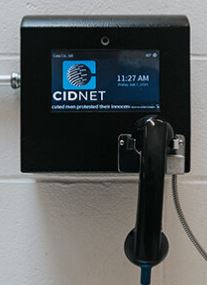
Frequently Asked Questions
Instructions on How to Use CIDNET
CIDNET Instrucciones
CIDNET help line (choose prompt 2), also the number inmate calls come from: (888) 984-1903
We’ve compiled a list of Frequently Asked Questions and Answers for everything you need to know about Hutchins Police Department Jail’s Inmate Visitation Policies, Rules and Guidelines. If you still have questions after reviewing these FAQs, call 972-225-2225 for further assistance.
⇓ Learn more ⇓ Show lessCan I Use My Computer or Phone to Have a Remote Video Visit with an Inmate in the Hutchins Police Department Jail?
Hutchins Police Department Jail uses CIDNET for Remote Video Visitation between inmates and their friends and family.
Register here.
Friends & Family Portal Information
Frequently Asked Questions
Instructions on How to Use CIDNET
CIDNET Instrucciones
CIDNET help line (choose prompt 2), also the number inmate calls come from: (888) 984-1903
We’ve compiled a list of Frequently Asked Questions and Answers for everything you need to know about Hutchins Police Department Jail’s Video Remote Visitation Policies, Rules and Guidelines. If you still have questions after reviewing these FAQs, call 972-225-2225 for further assistance.
⇓ Learn more ⇓ Show lessHow Do You Deposit Money for an Inmate in the Hutchins Police Department Jail?
Depositing Money in an Inmate's Commissary Account at Hutchins Police Department Jail

Whatever cash the inmate has on their person when booked into the facility will automatically deposited and credited to their account. When released any money left in the account will be returned to them in the form of a check from the Sheriff's Department or the Hutchins Police Department Jail Trust Account. There may be circumstances where the inmate can give permission to have his money released to a family member or friend.
Option 1 - Dropping Money at the Jail
- Bring money to the jail in person.
- The jail personnel will process the Inmate Account payment. Cash or Money Order only.
Option 2 - Mail the Inmate Deposit to the Jail
- Mailing a deposit takes more time to process than the other methods but can be done if you live too far away to bring it in person.
- Never send cash. Always send a Money Order or Cashier's Check from the US Post Office, a reputable bank or Western Union.
- Make the Money Order out to the inmate and put their Inmate ID# in memo section of the Money Order.
Mail to the Jail.
550 West Palestine Street
Hutchins, TX 75141

Failure to do this properly will delay your inmate getting their account credited and may require you to have to resubmit a second money order.
Call 972-225-2225 to ask any questions about this.
We’ve compiled a list of Frequently Asked Questions and Answers for everything you need to know about Hutchins Police Department Jail’s Inmate Money and Trust Fund Policies, Rules and Guidelines. If you still have questions after reviewing these FAQs, call 972-225-2225 for further assistance.
⇓ Learn more ⇓ Show lessHow Do I Receive Phone Calls from an Inmate in the Hutchins Police Department Jail?
How to Make and Receive Phone Calls and Video Phone Calls from an Inmate in Dallas County
To register and sign up for a phone account with CIDNET Inmate Phone Service, follow the instructions below:
- Register and create an account with CIDNET.
- Type in your Email, Time Zone and First & Last Name of your Hutchins Police Department Jail inmate.
1. Click the Create Account button.
2. Read the Terms of Use, then click Agree.
3. Login to your email and open the CIDNET email.
4. In the email, click the Complete Your Verification link.
5. Choose a Security PIN and a Password.
6. Click the Sign In button. - After logging in, from the Menu, choose the state of Texas, then the Hutchins Police Department Jail, then your inmate's name.
- Once you have completed this, the Hutchins Police Department Jail will have to give final approval for you to set up a phone account with your inmate.
For all the information you need to know, including instructions, policies, tips and solutions to possible issues regarding making phone calls with an inmate in Dallas County, visit our full page guide.
NOTE: All phone conversations are recorded. Whatever you talk about, can and will be used against your inmate in court. Never discuss their pending criminal case!
We’ve compiled a list of Frequently Asked Questions and Answers for everything you need to know about Hutchins Police Department Jail’s Inmate Phone Policies, Rules and Guidelines. If you still have questions after reviewing these FAQs, call 972-225-2225 for further assistance.
⇓ Learn more ⇓ Show lessHow do I Mail an Inmate in the Hutchins Police Department Jail, and what can I send them?
We’ve compiled a list of Frequently Asked Questions and Answers for everything you need to know about Hutchins Police Department Jail’s Inmate Mail Policies, Rules and Guidelines. If you still have questions after reviewing these FAQs, call 972-225-2225 for further assistance.
⇓ Learn more ⇓ Show lessCan I purchase Commissary Online for an Inmate in the Hutchins Police Department Jail, and what can I purchase?
Depositing Money in an Inmate's Commissary Account at Hutchins Police Department Jail
Whatever cash the inmate has on their person when booked into the facility will automatically deposited and credited to their account. When released any money left in the account will be returned to them in the form of a check from the Sheriff's Department or the Hutchins Police Department Jail Trust Account. There may be circumstances where the inmate can give permission to have his money released to a family member or friend.
Option 1 - Dropping Money at the Jail
- Bring money to the jail in person.
- The jail personnel will process the Inmate Account payment. Cash or Money Order only.
Option 2 - Mail the Inmate Deposit to the Jail
- Mailing a deposit takes more time to process than the other methods but can be done if you live too far away to bring it in person.
- Never send cash. Always send a Money Order or Cashier's Check from the US Post Office, a reputable bank or Western Union.
- Make the Money Order out to the inmate and put their Inmate ID# in memo section of the Money Order.
Mail to the Jail.
550 West Palestine Street
Hutchins, TX 75141
Failure to do this properly will delay your inmate getting their account credited and may require you to have to resubmit a second money order.
Call 972-225-2225 to ask any questions about this.
We’ve compiled a list of Frequently Asked Questions and Answers for everything you need to know about Hutchins Police Department Jail’s Commissary Policies, Rules and Guidelines. If you still have questions after reviewing these FAQs, call 972-225-2225 for further assistance.
⇓ Learn more ⇓ Show lessHow Can I Communicate with an Inmate in the Hutchins Police Department Jail using an Online Messaging Service?
Hutchins Police Department Jail uses CIDNET for Digital Mail Messaging between inmates and their friends and family.
Register here.
Friends & Family Portal Information
Frequently Asked Questions
Instructions on How to Use CIDNET
CIDNET Instrucciones
CIDNET help line (choose prompt 2), also the number inmate calls come from: (888) 984-1903
How to send a text or email to an inmate in Dallas County
To send and receive secure texts or emails from an inmate housed in Dallas County follow these instructions:
- Register and create an account with CIDNET.
- Choose a Security PIN and Password.
- After logging in, from the Menu, choose the state of Texas, then the Hutchins Police Department Jail, then your inmate's name.
- Once you have completed this, the Hutchins Police Department Jail will have to give final approval for you to communicate by email with your chosen inmate.
For all the information you need to know, including instructions, policies, tips and solutions to possible issues with Texting and Emailing an inmate in Dallas County, visit our full page guide.
We’ve compiled a list of Frequently Asked Questions and Answers for everything you need to know about Hutchins Police Department Jail’s Text and Email Policies, Rules and Guidelines. If you still have questions after reviewing these FAQs, call 972-225-2225 for further assistance.
⇓ Learn more ⇓ Show lessDo Inmates in the Hutchins Police Department Jail have Access to Tablets or Computers?
Hutchins Police Department Jail may now offer CIDNET Tablet Rentals to their inmates.
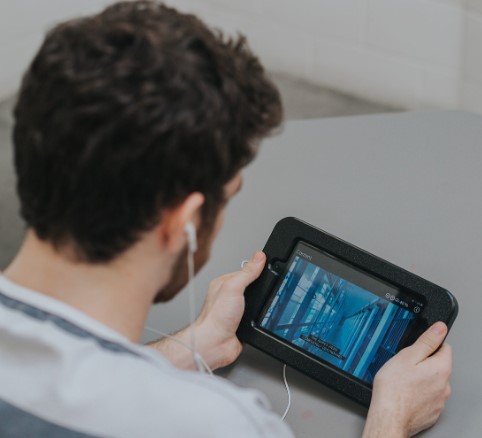
CIDNET is the same company that handles inmate phone systems, video visitations, email and texting and digital letters.
The tablets can be rented on a monthly basis and while not directly connected to the internet, the inmates can use them for the following activities:
- Phone Calls - Inmates may make calls directly from their tablet allowing for more privacy. The rates are the same as the phones in the unit, and the calls are still recorded and monitored.
- eMessaging - Communicate via a text based message or picture. Fee based system.
- Education - Free educational platform and course catalog that provides thousands of educational resources.
- Self Help -Inmates have daily access to mental health and addiction recovery programming.
- Music - Top-40, Hip-Hop, Country, Rock, Gospel, and more.
- Law Library - Legal research with up-to-date case information.
- eBooks - Thousands of available titles.
- Religion - Religious resources for spiritual guidance.
- Games - Inmates can play their favorite games. Available through monthly subscriptions
- Facility Services - Digital access to submitted forms, requests, facility documents, and notifications from staff.
Here's how it works:
- Register here.
- Pay for the subscription.
- You get charged the 1st of each month.
- You get charged a full month even if it's only used for a partial month.
- No activation or early termination fees.
- Your inmate will recieve their tablet in 3-5 business days, after you pay.
We’ve compiled a list of Frequently Asked Questions and Answers for everything you need to know about Hutchins Police Department Jail’s Tablet Policies, Rules and Guidelines. If you still have questions after reviewing these FAQs, call 972-225-2225 for further assistance.
⇓ Learn more ⇓ Show lessWhat are the other City and County Jails in Dallas County?
Dallas County County Jails
Dallas County City Jails
Dallas County Juvenile Facilities
What are the other Jails in the Neighboring Counties surrounding Dallas County?
Nearby counties
The Hutchins Police Department Jail serves the following cities and towns of Dallas County: Addison, Balch Springs, Carrollton, Cedar Hill, Cockrell Hill, Combine, Coppell, Dallas, DeSoto, Duncanville, Farmers Branch, Ferris, Garland, Glenn Heights, Grand Prairie, Highland Park, Hutchins, Irving, Lancaster, Mesquite, Ovilla, Richardson, Rowlett, Sachse, Seagoville, Sunnyvale, University Park and Wilmer.